Freshly wiped servers, a live status for your own server and server lookups with a join button, straight in your Discord. Free, set up in a minute, and it only posts where you tell it to.
Once an hour, DayZ servers with 20+ players whose name just announced a wipe. The five biggest as cards with map, players, version and mod list. Plus wipes that server owners announce in CHERNO, with a reminder an hour before.
Live server status
A message for your own server that updates itself every 1, 2 or 5 minutes: online or offline, players, map, time in game, mods and a join button.
Server lookup
/server 1.2.3.4:2302 posts any server as a card. The address DayZ shows is enough, the bot finds the query port itself.
Filters
Only Livonia wipes? Only 1PP? Only servers with 60+ players? /wipefeed filter keeps the feed to what your community plays.
CHERNO updates
New launcher versions with their changelog, in a channel of your choice.
The join button
Opens the CHERNO launcher right on the server. It asks first, shows which mods are missing and how big the download is, and installs them.
Bot tab as control centre New
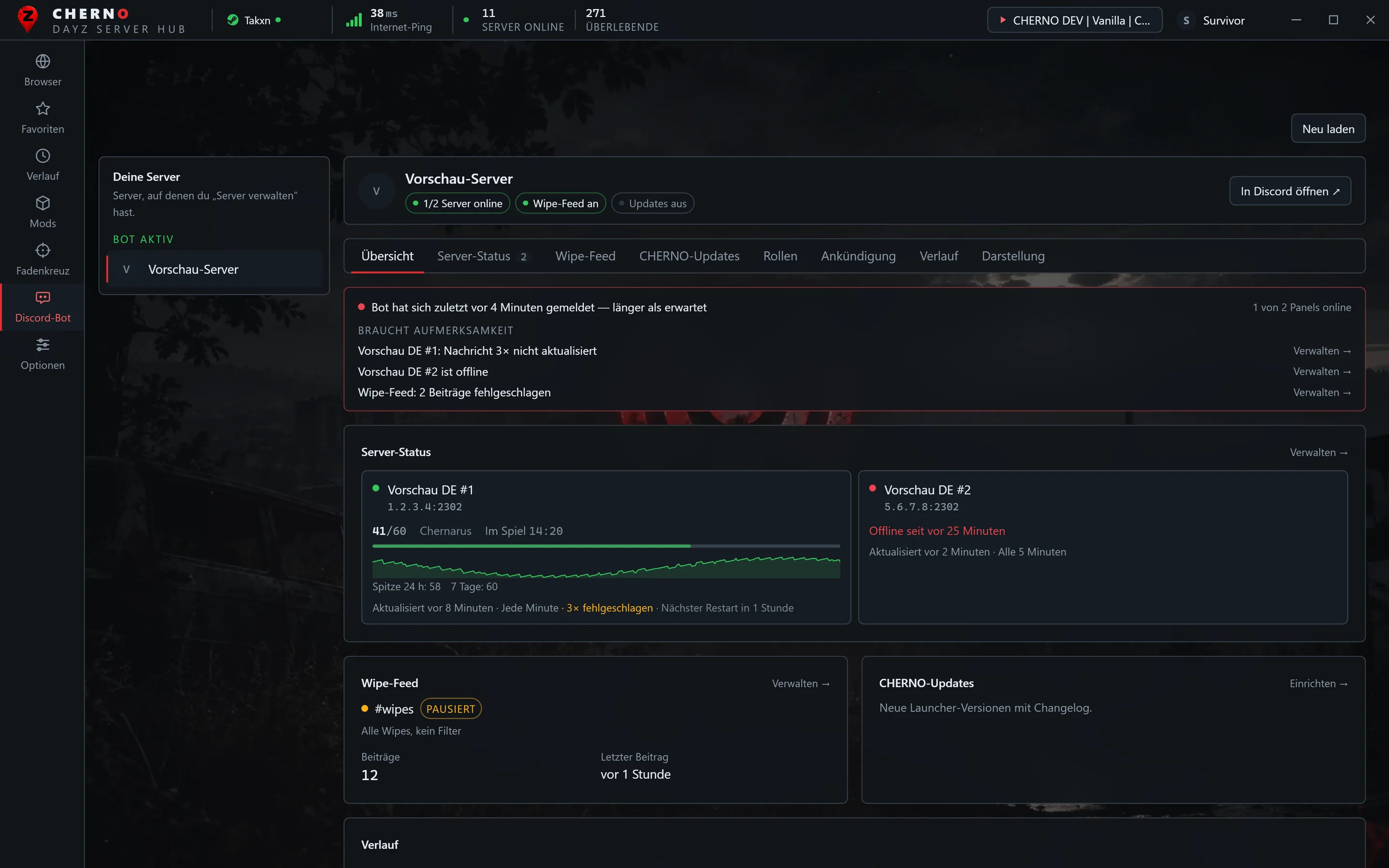
A health strip shows whether the bot is running and what needs attention: panel offline, message not updatable, feed errors — each with a jump to the right place. Activity keeps 100 entries with filters.
Player history New
Every status panel records the player count: a 24-hour curve with peaks for 24 hours and 7 days in the bot tab, and “Peak (24 h)” in the Discord status message. /history shows it to everyone.
Scheduled restarts, one message New
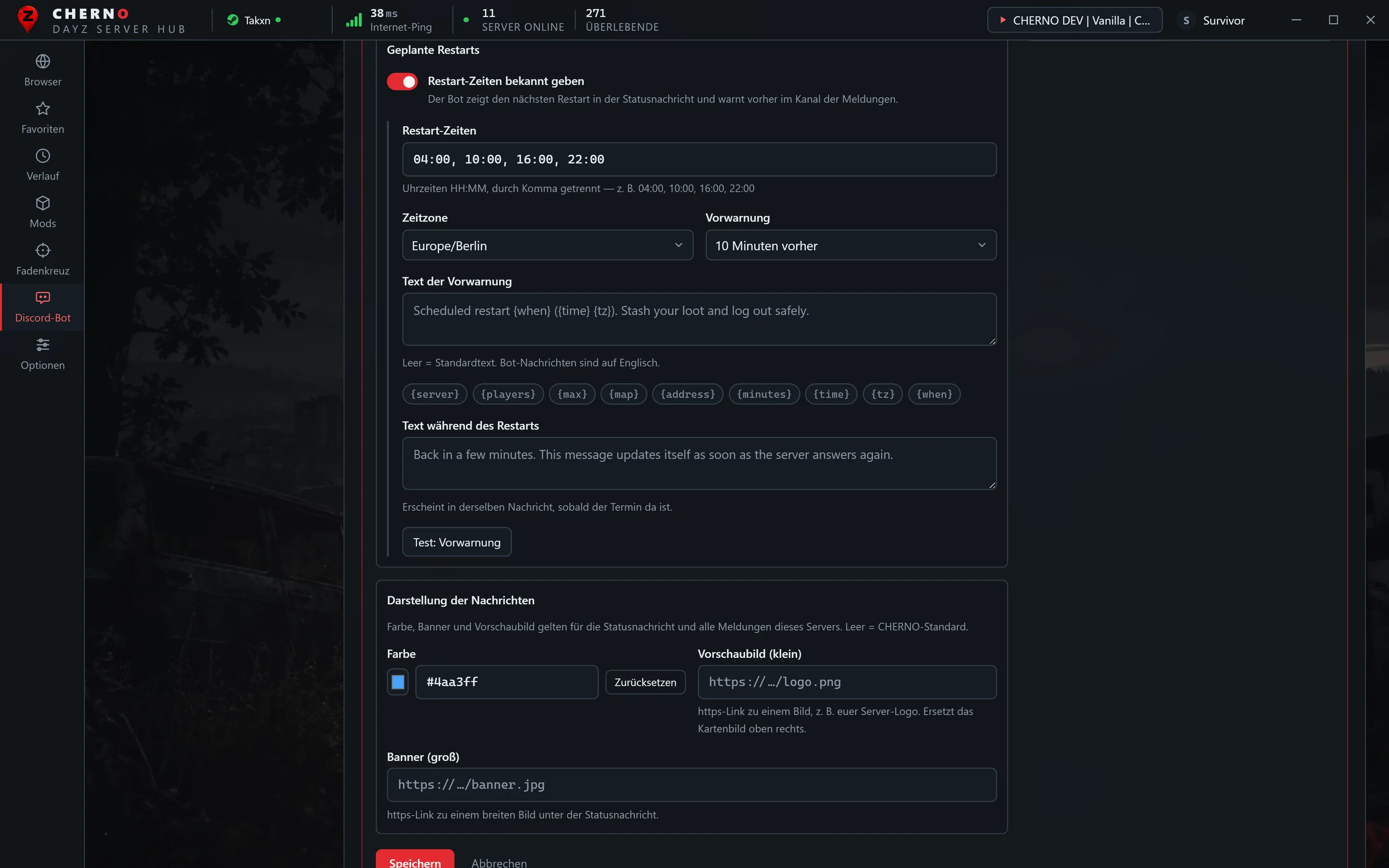
Enter your restart times and time zone. The status message shows the next restart; before it, one message tells the whole story — “restart in 10 minutes” becomes “restarting now” and then “back online”. It deletes itself after a time you choose.
Roles by button New
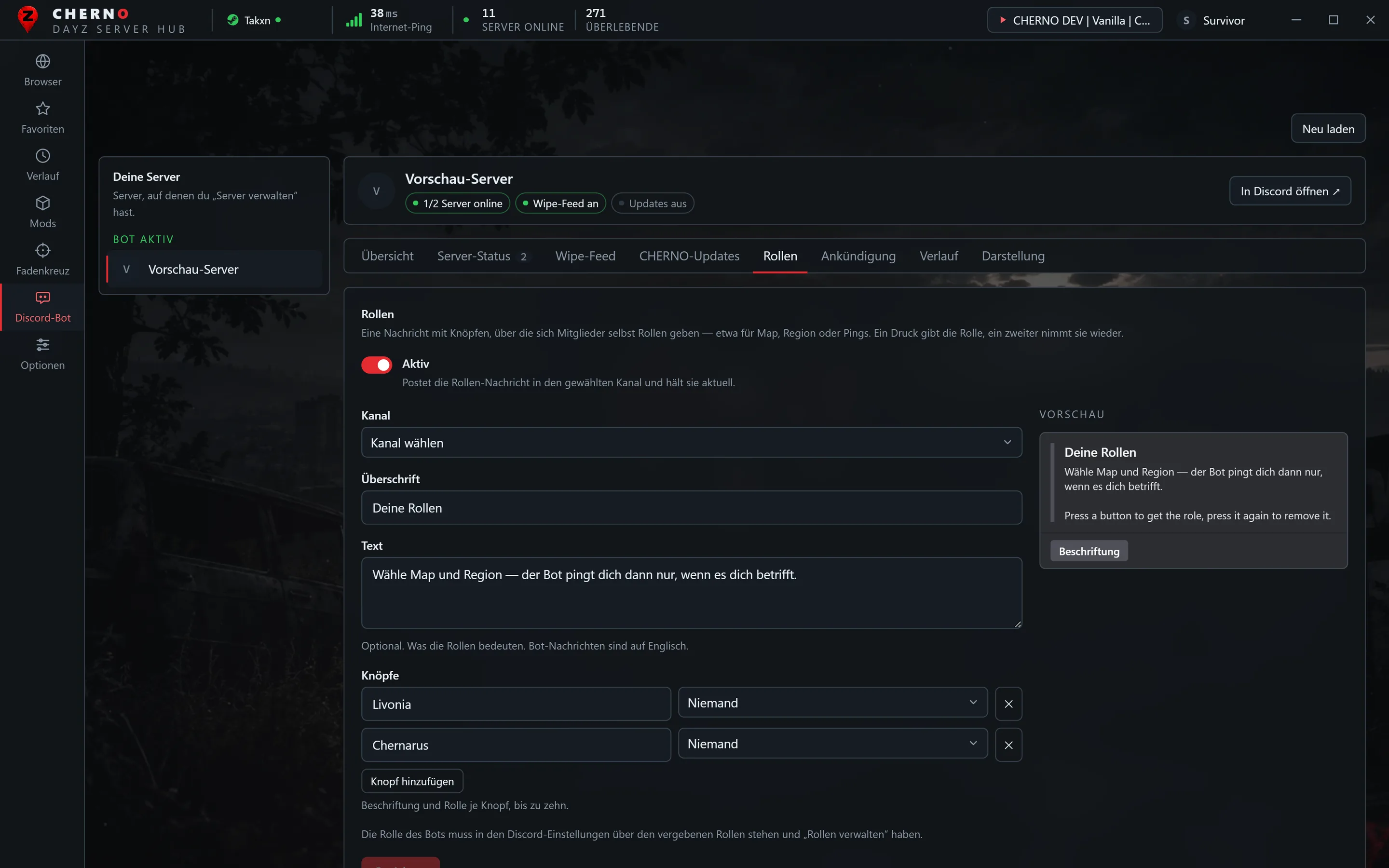
A message with up to ten buttons: one press gives a member the role — map, region, pings — a second removes it. Set up in the launcher, with preview.
Announcements from the launcher New
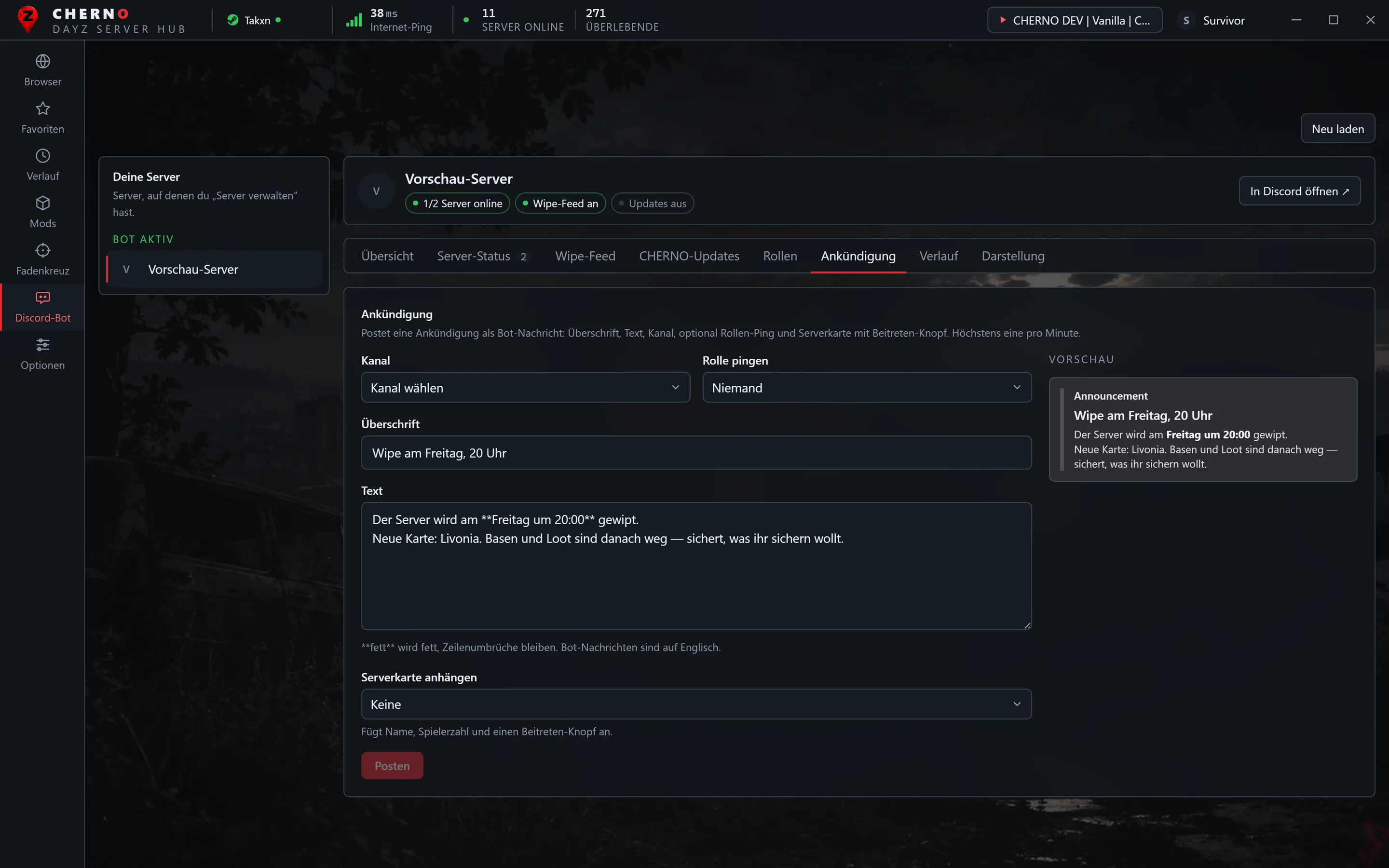
Heading, text, channel, optional role ping and a server card with join button. Preview first, confirmation, then it posts as the bot.
Mod change alerts New
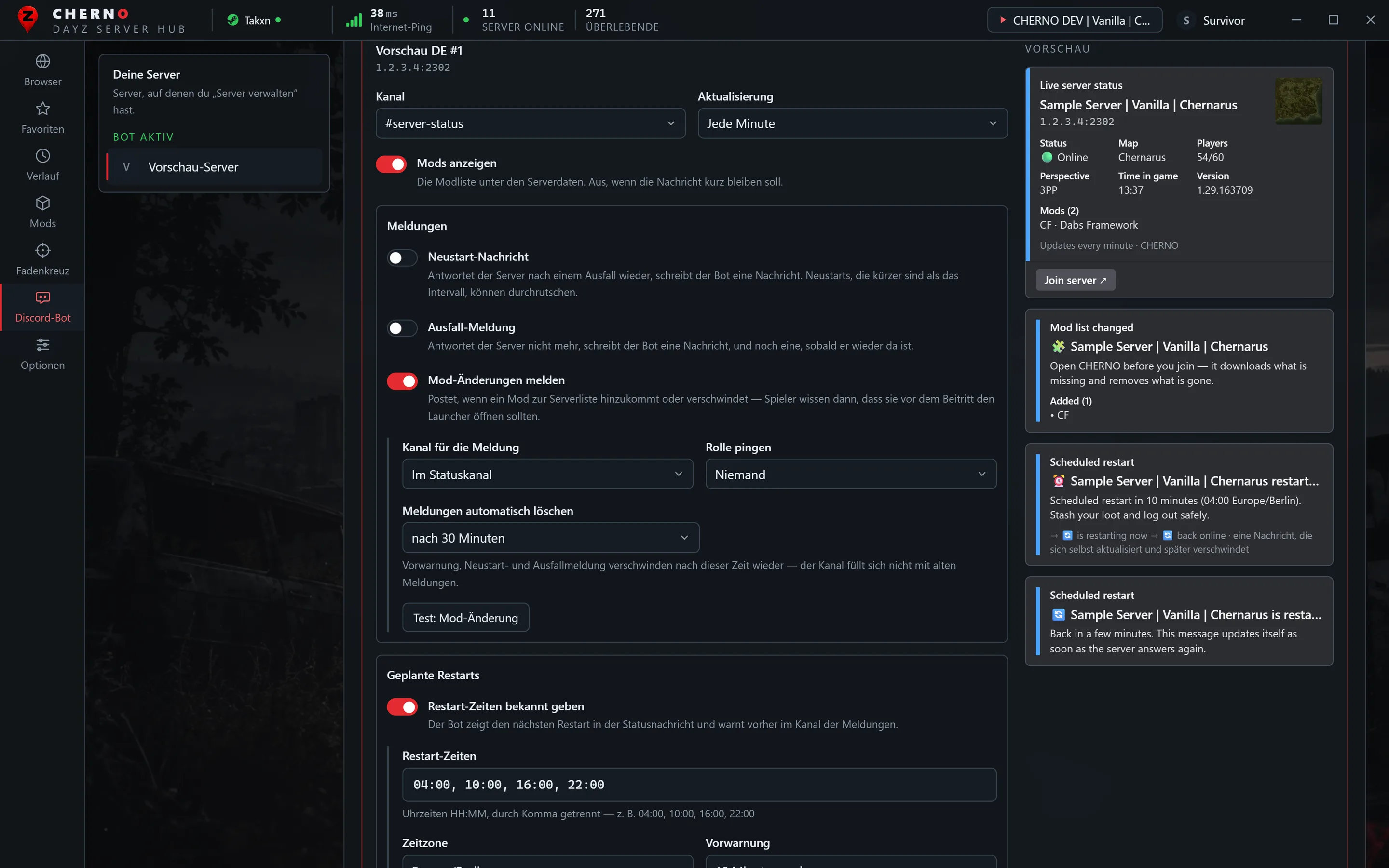
When a mod is added to or removed from your server's list, the bot posts what changed — players know to open the launcher before joining.
Your own look New
Embed colour, your server logo as thumbnail, a banner below the status message and your own wording with placeholders for every alert — all with live preview.
A DM when a slot is free New
/slot 1.2.3.4:2302 on a full server: the bot sends a DM with a join button as soon as someone leaves, for up to two hours. Feeds can be paused; /restarts shows the next restart.
Restart and outage alerts
The bot watches your server minute by minute. When it stops answering, it posts an outage message after 2, 5 or 10 minutes; when it is back, a restart message in your own wording. Channel and ping role are yours to pick.
Set it up in the launcher
Sign in with Discord in CHERNO and the Discord bot tab appears: every server you manage, with status messages, alerts, wipe feed, update feed, a live preview of the message and a test button that posts the real thing.
Live status for everyone
Members do not need Manage Server to look: /status shows the live state of every server this Discord watches, or of any address. Only the person asking sees it, unless they choose to post it.
The bot tab in the launcher New
Screenshots from the launcher with sample data. The servers are invented.
Overview with health strip, attention list and the player curve of each serverScheduled restarts with time zone, warning and automatic clean-upLive preview of every message, in your own colourThe role message: buttons, roles and previewAn announcement, written and posted from the launcher
The status message: online state, players, queue, map, time in game and mods — updated every minute, with a join button.
A wipe post: map, players, perspective and the mod list, with the same join button.
Set it up
Press Add to Discord above, pick your server and choose Add to server. You need Manage Server there.
Run /wipefeed setup, pick a channel and, if you like, a role to ping. The bot posts a first message right away, so you can see it has the rights it needs.
Optional: /wipefeed filter for maps, perspective and minimum players.
Optional: /serverstatus setup with your server address and a channel for the live status.
Forgot something? /help shows everything, only to you.
Where posts go and which filters apply · stop the feed
/serverstatus setup
Manage Server
Live status message for a server, up to 3 per Discord
/serverstatus list · remove
Manage Server
Show or delete status messages
/updatefeed setup · off
Manage Server
CHERNO launcher updates in a channel
/server
Everyone
Posts one server as a card with join button
/status
Everyone
Live status of this Discord's servers or any address, only visible to you unless posted
/wipes
Everyone
Upcoming wipes announced in CHERNO, optionally for one map
/players
Everyone
How many people use the CHERNO launcher right now
/restarts
Everyone
When this Discord's servers restart next
/history
Everyone
Player counts of the last 24 hours, with peaks
/slot
Everyone
A DM as soon as a full server has a free slot
/help
Everyone
This overview, only visible to you
Rights and data
In the channels you choose, the bot needs View Channel, Send Messages and Embed Links. Nothing else.
It only posts where you set it up. It doesn't moderate, doesn't DM your members and ignores their messages.
It stores your Discord server's ID with the chosen channel, ping role, filters and status addresses. Nothing about your members.
Remove the bot and all of that is deleted. After three failed posts in a row, for example because the channel is gone, it stops on its own.
Server data comes from the public DayZ server list. Details: privacy policy.
Why trust this?
CHERNO is new. Rather than pretend otherwise, here is where the project stands.
In beta, and openly so
The launcher is in beta. It works, it is used daily, and it still has rough edges. Every release lists what changed.
Built by one person
One developer, no company behind it, no investors. That means direct answers, and it means fewer hands — bug reports usually get a reply the same day.
No server partners yet
There are no big partner servers and no sponsorships. Anyone claiming otherwise would be making it up. The first servers to come along shape what gets built next.
Costs nothing, asks for nothing
Launcher and bot are free. No ads, no paid placement in the server list, no account needed. Discord sign-in is optional and only for the bot tab and ratings.
Only what it needs
The bot stores your Discord server's ID with the channels and settings you chose. Nothing about your members. Remove it and that is gone.
You run a DayZ server?
Then you are exactly who this is being built for. The bot brings your server into your Discord — live status, restart and outage alerts, wipe posts — and the launcher gets players onto it in one click, with the mods installed. What I am looking for right now: servers that try it and tell me what is missing. Feedback goes straight to the person who writes the code.
A join button that installs missing mods instead of sending players to the Workshop
Your server in the browser with map, players, ping, mods and your own description
Live status and alerts in your Discord, without a bot of your own
Announce your wipes so they reach players in CHERNO and in every wipe feed
Or write to me on the CHERNO Discord — the ticket lands with me directly.
Questions
The bot doesn't join my server.
Make sure you pick Add to server, not Add to my apps, and that you have Manage Server on that server.
The role doesn't get pinged.
In the role settings, turn on Allow anyone to @mention this role. The bot never pings @everyone.
How does it know a server wiped?
From two sources: server owners who announce their wipe in CHERNO, and servers whose name changes to announce a fresh wipe, like … | WIPE 18.09.
My server is offline in the status, but it's running.
The status asks the public server list. A server that is hidden from it, or blocks queries, shows as offline.
Does it cost anything?
No. The bot and the CHERNO launcher are free.
Discord-Bot Beta
Der CHERNO-Bot für deinen DayZ-Discord
Frisch gewipte Server, ein Live-Status für deinen eigenen Server und Server-Abfragen mit Beitreten-Knopf, direkt in deinem Discord. Kostenlos, in einer Minute eingerichtet, und er postet nur dort, wo du es ihm sagst.
Einmal pro Stunde DayZ-Server mit 20+ Spielern, deren Name gerade einen Wipe meldet. Die fünf größten als Karte mit Map, Spielern, Version und Modliste. Dazu Wipes, die Serverbesitzer in CHERNO ankündigen, mit Erinnerung eine Stunde vorher.
Live-Serverstatus
Eine Nachricht für deinen eigenen Server, die sich jede Minute oder alle 2 bzw. 5 Minuten selbst aktualisiert: online oder offline, Spieler, Map, Uhrzeit im Spiel, Mods und Beitreten-Knopf.
Server-Abfrage
/server 1.2.3.4:2302 postet jeden Server als Karte. Die Adresse aus DayZ reicht, den Abfrageport findet der Bot selbst.
Filter
Nur Livonia-Wipes? Nur 1PP? Nur Server ab 60 Spielern? Mit /wipefeed filter bekommt deine Community nur, was sie spielt.
CHERNO-Updates
Neue Launcher-Versionen mit Changelog in einem Kanal deiner Wahl.
Der Beitreten-Knopf
Öffnet den CHERNO-Launcher direkt auf dem Server. Er fragt vorher nach, zeigt fehlende Mods und die Downloadgröße und installiert sie.
Bot-Tab als Kontrollzentrum Neu
Eine Gesundheitsleiste zeigt, ob der Bot läuft und was Aufmerksamkeit braucht: Panel offline, Nachricht nicht aktualisierbar, Feed-Fehler — jeweils mit Sprung zur richtigen Stelle. Der Verlauf hält 100 Einträge mit Filtern.
Spielerzahl-Verlauf Neu
Jedes Statuspanel zeichnet die Spielerzahl auf: eine 24-Stunden-Kurve mit Spitze für 24 Stunden und 7 Tage im Bot-Tab, dazu „Peak (24 h)“ in der Discord-Statusnachricht. /history zeigt sie allen.
Geplante Restarts, eine Nachricht Neu
Trag deine Restart-Zeiten und Zeitzone ein. Die Statusnachricht zeigt den nächsten Restart; davor erzählt eine einzige Nachricht alles — „Restart in 10 Minuten“ wird zu „startet jetzt neu“ und dann zu „wieder online“. Sie löscht sich nach einer Zeit deiner Wahl.
Rollen per Knopf Neu
Eine Nachricht mit bis zu zehn Knöpfen: ein Druck gibt dem Mitglied die Rolle — Map, Region, Pings — ein zweiter nimmt sie wieder. Einrichten im Launcher, mit Vorschau.
Ankündigungen aus dem Launcher Neu
Überschrift, Text, Kanal, optional Rollen-Ping und Serverkarte mit Beitreten-Knopf. Erst Vorschau, dann Rückfrage, dann postet der Bot.
Mod-Änderungen melden Neu
Kommt ein Mod zur Liste deines Servers hinzu oder verschwindet einer, postet der Bot, was sich geändert hat — Spieler wissen, dass sie vor dem Beitritt den Launcher öffnen sollten.
Deine eigene Darstellung Neu
Embed-Farbe, dein Server-Logo als Vorschaubild, ein Banner unter der Statusnachricht und eigene Texte mit Platzhaltern für jede Meldung — alles mit Live-Vorschau.
DM, sobald ein Platz frei ist Neu
/slot 1.2.3.4:2302 auf einem vollen Server: der Bot schickt eine DM mit Beitreten-Knopf, sobald jemand geht, bis zu zwei Stunden. Feeds lassen sich pausieren, /restarts zeigt den nächsten Restart.
Neustart- und Ausfall-Meldung
Der Bot sieht jede Minute nach deinem Server. Antwortet er nicht mehr, meldet er den Ausfall nach 2, 5 oder 10 Minuten; ist er wieder da, kommt die Neustart-Nachricht in deinen eigenen Worten. Kanal und Ping-Rolle bestimmst du.
Einrichten im Launcher
In CHERNO mit Discord anmelden, schon ist der Tab „Discord-Bot“ da: jeder Server, den du verwaltest, mit Statusnachrichten, Meldungen, Wipe-Feed, Update-Feed, Live-Vorschau der Nachricht und einem Testknopf, der die echte Nachricht postet.
Live-Status für alle
Zum Nachsehen braucht niemand „Server verwalten“: /status zeigt den Live-Zustand aller Server, die dieser Discord beobachtet, oder einer beliebigen Adresse. Die Antwort sieht nur, wer fragt — außer er postet sie bewusst.
Der Bot-Tab im Launcher Neu
Screenshots aus dem Launcher mit Beispieldaten. Die Server sind erfunden.
Übersicht mit Gesundheitsleiste, Aufmerksamkeitsliste und Spielerkurve je ServerGeplante Restarts mit Zeitzone, Vorwarnung und automatischem AufräumenLive-Vorschau jeder Nachricht, in eigener FarbeDie Rollen-Nachricht: Knöpfe, Rollen und VorschauEine Ankündigung, im Launcher geschrieben und gepostet
Die Statusnachricht: online oder offline, Spieler, Warteschlange, Map, Uhrzeit im Spiel und Mods — jede Minute aktualisiert, mit Beitreten-Knopf.
Ein Wipe-Beitrag: Map, Spieler, Perspektive und Modliste, mit demselben Beitreten-Knopf.
Einrichten
Oben auf Zu Discord hinzufügen, deinen Server wählen und Zum Server hinzufügen. Dafür brauchst du dort Server verwalten.
/wipefeed setup ausführen, einen Kanal und bei Bedarf eine Ping-Rolle wählen. Der Bot schickt sofort eine erste Nachricht, so siehst du, dass er schreiben darf.
Optional: /wipefeed filter für Maps, Perspektive und Mindestspieler.
Optional: /serverstatus setup mit deiner Serveradresse und einem Kanal für den Live-Status.
Etwas vergessen? /help zeigt alles, nur für dich sichtbar.
Befehle
Befehl
Wer
Was er macht
/wipefeed setup
Server verwalten
Kanal für Wipe-Beiträge, optional Ping-Rolle
/wipefeed filter
Server verwalten
Maps (mit Komma getrennt), 1PP/3PP, Mindestspieler. Leer setzt zurück.
/wipefeed status · off
Server verwalten
Wohin gepostet wird und welche Filter gelten · Feed beenden
/serverstatus setup
Server verwalten
Live-Status für einen Server, bis zu 3 pro Discord
/serverstatus list · remove
Server verwalten
Statusnachrichten anzeigen oder löschen
/updatefeed setup · off
Server verwalten
CHERNO-Updates in einem Kanal
/server
Alle
Postet einen Server als Karte mit Beitreten-Knopf
/status
Alle
Live-Status der Server dieses Discords oder einer beliebigen Adresse, nur für dich sichtbar, außer mit post
/wipes
Alle
Angekündigte Wipes der nächsten Tage, optional für eine Map
/players
Alle
Wie viele gerade den CHERNO-Launcher nutzen
/restarts
Alle
Wann die Server dieses Discords als Nächstes neu starten
/history
Alle
Spielerzahlen der letzten 24 Stunden mit Spitzen
/slot
Alle
Eine DM, sobald ein voller Server einen freien Platz hat
/help
Alle
Diese Übersicht, nur für dich sichtbar
Rechte und Daten
In den gewählten Kanälen braucht der Bot Kanal ansehen, Nachrichten senden und Links einbetten. Sonst nichts.
Er postet nur dort, wo du ihn eingerichtet hast. Er moderiert nicht, schreibt deinen Mitgliedern keine DMs und ignoriert ihre Nachrichten.
Gespeichert wird die ID deines Discord-Servers mit Kanal, Ping-Rolle, Filtern und Status-Adressen. Nichts über deine Mitglieder.
Entfernst du den Bot, wird all das gelöscht. Nach drei fehlgeschlagenen Beiträgen in Folge, etwa weil der Kanal weg ist, hört er von selbst auf.
Die Serverdaten stammen aus der öffentlichen DayZ-Serverliste. Einzelheiten: Datenschutzerklärung.
Warum solltest du dem vertrauen?
CHERNO ist neu. Statt so zu tun, als wäre es anders, hier der ehrliche Stand.
In der Beta, und das offen
Der Launcher ist in der Beta. Er läuft, er wird täglich benutzt, und er hat noch Ecken. Jede Version listet auf, was sich geändert hat.
Von einer Person gebaut
Ein Entwickler, keine Firma, keine Investoren. Das heißt: direkte Antworten — und weniger Hände. Fehlermeldungen bekommen meist am selben Tag eine Antwort.
Noch keine Server-Partner
Es gibt keine großen Partnerserver und keine Sponsoren. Wer etwas anderes behauptet, erfindet es. Die ersten Server, die mitmachen, bestimmen mit, was als Nächstes gebaut wird.
Kostet nichts, will nichts
Launcher und Bot sind kostenlos. Keine Werbung, keine bezahlten Plätze in der Serverliste, kein Konto nötig. Die Discord-Anmeldung ist freiwillig und nur für den Bot-Tab und Bewertungen.
Nur das Nötige
Der Bot speichert die ID deines Discord-Servers mit den Kanälen und Einstellungen, die du gewählt hast. Nichts über deine Mitglieder. Entfernst du ihn, ist das weg.
Du betreibst einen DayZ-Server?
Dann wird genau dafür gebaut. Der Bot holt deinen Server in deinen Discord — Live-Status, Neustart- und Ausfall-Meldungen, Wipe-Beiträge — und der Launcher bringt Spieler mit einem Klick darauf, inklusive Mods. Was ich gerade suche: Server, die es ausprobieren und mir sagen, was fehlt. Rückmeldungen landen direkt bei dem, der den Code schreibt.
Ein Beitreten-Knopf, der fehlende Mods installiert, statt Spieler in den Workshop zu schicken
Dein Server im Browser mit Map, Spielern, Ping, Mods und deiner eigenen Beschreibung
Live-Status und Meldungen in deinem Discord, ohne eigenen Bot
Wipes ankündigen, damit sie Spieler in CHERNO und in jedem Wipe-Feed erreichen
Oder schreib mir im CHERNO-Discord — das Ticket landet direkt bei mir.
Fragen
Der Bot tritt meinem Server nicht bei.
Wähle Zum Server hinzufügen, nicht Zu meinen Apps hinzufügen, und prüfe, dass du auf dem Server Server verwalten hast.
Die Rolle wird nicht gepingt.
In den Rolleneinstellungen Jedem erlauben, diese Rolle zu @erwähnen einschalten. @everyone pingt der Bot nie.
Woher weiß er, dass ein Server gewipt hat?
Aus zwei Quellen: Serverbesitzer, die ihren Wipe in CHERNO ankündigen, und Server, deren Name sich ändert und einen frischen Wipe meldet, etwa … | WIPE 18.09.
Mein Server steht im Status als offline, läuft aber.
Der Status fragt die öffentliche Serverliste. Ein Server, der dort versteckt ist oder Abfragen blockiert, erscheint als offline.
Kostet das etwas?
Nein. Der Bot und der CHERNO-Launcher sind kostenlos.
Discord-бот Бета
Бот CHERNO для вашего DayZ-Discord
Свежевайпнутые серверы, живой статус вашего сервера и поиск серверов с кнопкой входа прямо в вашем Discord. Бесплатно, настройка за минуту, и бот пишет только туда, куда вы скажете.
Раз в час — серверы DayZ с 20+ игроками, в названии которых только что появился вайп. Пять крупнейших — карточками с картой, игроками, версией и списком модов. Плюс вайпы, которые владельцы серверов анонсируют в CHERNO, с напоминанием за час.
Живой статус сервера
Сообщение для вашего сервера, которое само обновляется каждые 1, 2 или 5 минут: онлайн или офлайн, игроки, карта, время в игре, моды и кнопка входа.
Поиск сервера
/server 1.2.3.4:2302 публикует любой сервер карточкой. Хватит адреса из DayZ — порт запросов бот найдёт сам.
Фильтры
Только вайпы Livonia? Только 1PP? Только серверы от 60 игроков? /wipefeed filter оставит в ленте то, во что играет ваше сообщество.
Обновления CHERNO
Новые версии лаунчера со списком изменений — в выбранном вами канале.
Кнопка входа
Открывает лаунчер CHERNO прямо на сервере. Он сначала спросит, покажет недостающие моды и размер загрузки и установит их.
Вкладка бота как центр управления Новое
Полоса состояния показывает, работает ли бот и что требует внимания: панель офлайн, сообщение не обновляется, ошибки ленты — с переходом в нужное место. История хранит 100 записей с фильтрами.
История игроков Новое
Каждая панель статуса записывает число игроков: график за 24 часа с пиками за 24 часа и 7 дней во вкладке бота и «Peak (24 h)» в сообщении статуса. /history показывает его всем.
Плановые рестарты, одно сообщение Новое
Укажите время рестартов и часовой пояс. Сообщение статуса показывает следующий рестарт; перед ним одно сообщение рассказывает всё — «рестарт через 10 минут» становится «перезапускается», затем «снова онлайн». Оно удаляется через выбранное время.
Роли по кнопке Новое
Сообщение с десятью кнопками максимум: первое нажатие даёт участнику роль — карта, регион, пинги — второе снимает. Настраивается в лаунчере, с предпросмотром.
Объявления из лаунчера Новое
Заголовок, текст, канал, необязательный пинг роли и карточка сервера с кнопкой входа. Сначала предпросмотр, затем подтверждение, потом бот публикует.
Оповещения об изменении модов Новое
Когда мод добавлен в список вашего сервера или удалён, бот публикует, что изменилось — игроки знают, что перед входом нужно открыть лаунчер.
Своё оформление Новое
Цвет эмбедов, логотип сервера как миниатюра, баннер под сообщением статуса и свои тексты с плейсхолдерами для каждого оповещения — всё с живым предпросмотром.
ЛС, когда освободится место Новое
/slot 1.2.3.4:2302 на полном сервере: бот пришлёт ЛС с кнопкой входа, как только кто-то выйдет, до двух часов. Ленты можно приостановить, /restarts показывает следующий рестарт.
Сообщения о рестарте и падении
Бот проверяет сервер каждую минуту. Перестал отвечать — через 2, 5 или 10 минут появится сообщение о падении; вернулся — сообщение о рестарте вашими словами. Канал и роль для пинга выбираете вы.
Настройка прямо в лаунчере
Войдите в CHERNO через Discord — появится вкладка «Discord-бот»: все ваши серверы, статусы, оповещения, лента вайпов, лента обновлений, живой предпросмотр сообщения и кнопка теста, которая отправляет настоящее сообщение.
Живой статус для всех
Чтобы посмотреть, права «Управление сервером» не нужны: /status показывает состояние всех серверов этого Discord или любого адреса. Ответ видит только тот, кто спросил, если он сам не опубликует его.
Вкладка бота в лаунчере Новое
Скриншоты из лаунчера с примерными данными. Серверы вымышленные.
Обзор с полосой состояния, списком внимания и графиком игроковПлановые рестарты с часовым поясом, предупреждением и автоочисткойЖивой предпросмотр каждого сообщения в своём цветеСообщение с ролями: кнопки, роли и предпросмотрОбъявление, написанное и опубликованное из лаунчера
Сообщение статуса: онлайн, игроки, очередь, карта, время в игре и моды — обновляется каждую минуту, с кнопкой входа.
Публикация о вайпе: карта, игроки, перспектива и список модов, с той же кнопкой входа.
Настройка
Нажмите Добавить в Discord выше, выберите сервер и Добавить на сервер. Для этого на сервере нужно право Управлять сервером.
Выполните /wipefeed setup, выберите канал и, если хотите, роль для упоминания. Бот сразу отправит первое сообщение — так видно, что у него есть нужные права.
По желанию: /wipefeed filter для карт, вида от первого/третьего лица и минимума игроков.
По желанию: /serverstatus setup с адресом вашего сервера и каналом для живого статуса.
Что-то забыли? /help покажет всё — только вам.
Команды
Команда
Кто
Что делает
/wipefeed setup
Управлять сервером
Канал для постов о вайпах, роль для упоминания по желанию
/wipefeed filter
Управлять сервером
Карты (через запятую), 1PP/3PP, минимум игроков. Пусто — сброс.
/wipefeed status · off
Управлять сервером
Куда идут посты и какие фильтры действуют · выключить ленту
/serverstatus setup
Управлять сервером
Живой статус сервера, до 3 на один Discord
/serverstatus list · remove
Управлять сервером
Показать или удалить сообщения статуса
/updatefeed setup · off
Управлять сервером
Обновления лаунчера CHERNO в канале
/server
Все
Публикует сервер карточкой с кнопкой входа
/status
Все
Живой статус серверов этого Discord или любого адреса; видно только вам, если не указать post
/wipes
Все
Анонсированные вайпы на ближайшие дни, по желанию для одной карты
/players
Все
Сколько людей сейчас пользуются лаунчером CHERNO
/restarts
Все
Когда серверы этого Discord перезапустятся в следующий раз
/history
Все
Число игроков за последние 24 часа с пиками
/slot
Все
ЛС, как только на полном сервере освободится место
/help
Все
Этот обзор, виден только вам
Права и данные
В выбранных каналах боту нужны Просматривать каналы, Отправлять сообщения и Встраивать ссылки. Больше ничего.
Он пишет только туда, где вы его настроили. Он не модерирует, не пишет вашим участникам в личку и игнорирует их сообщения.
Сохраняется ID вашего Discord-сервера с выбранным каналом, ролью, фильтрами и адресами статусов. Ничего о ваших участниках.
Удалите бота — и всё это удалится. После трёх неудачных постов подряд, например если канал удалён, он останавливается сам.
CHERNO — молодой проект. Вместо красивых слов — как есть на самом деле.
Бета, и мы об этом говорим
Лаунчер в бете. Он работает, им пользуются каждый день, и шероховатости ещё есть. Каждая версия перечисляет, что изменилось.
Делает один человек
Один разработчик, без компании и инвесторов. Значит, прямые ответы — и меньше рук. На сообщения об ошибках обычно отвечают в тот же день.
Партнёрских серверов пока нет
Крупных партнёров и спонсоров нет. Кто утверждает обратное — выдумывает. Первые серверы, которые придут, и определят, что будет сделано дальше.
Бесплатно и без условий
Лаунчер и бот бесплатны. Ни рекламы, ни платных мест в списке серверов, аккаунт не нужен. Вход через Discord — по желанию, только для вкладки бота и оценок.
Только необходимое
Бот хранит ID вашего Discord-сервера с выбранными каналами и настройками. Ничего о ваших участниках. Удалите бота — всё это исчезнет.
У вас свой DayZ-сервер?
Тогда всё это делается именно для вас. Бот приносит сервер в ваш Discord — живой статус, сообщения о рестарте и падении, публикации о вайпах, — а лаунчер приводит игроков одним кликом, вместе с модами. Сейчас я ищу серверы, которые попробуют и скажут, чего не хватает. Отзывы попадают напрямую к тому, кто пишет код.
Кнопка входа, которая ставит недостающие моды, а не отправляет в Workshop
Ваш сервер в браузере: карта, игроки, пинг, моды и ваше описание
Живой статус и оповещения в вашем Discord — без собственного бота
Анонс вайпов, чтобы о них узнали игроки в CHERNO и во всех лентах вайпов
Или напишите мне в CHERNO Discord — тикет придёт прямо ко мне.
Вопросы
Бот не заходит на мой сервер.
Выберите Добавить на сервер, а не Добавить в мои приложения, и проверьте, что у вас есть право Управлять сервером.
Роль не упоминается.
В настройках роли включите Позволить всем @упоминать эту роль. @everyone бот не упоминает никогда.
Как он узнаёт о вайпе?
Из двух источников: владельцы серверов анонсируют вайп в CHERNO, и серверы меняют название на свежий вайп, например … | WIPE 18.09.
Сервер в статусе офлайн, хотя работает.
Статус опрашивает публичный список серверов. Сервер, скрытый оттуда или блокирующий запросы, показывается как офлайн.
Это платно?
Нет. Бот и лаунчер CHERNO бесплатны.
Discord-бот Бета
Бот CHERNO для вашого DayZ-Discord
Щойно вайпнуті сервери, живий статус вашого сервера та пошук серверів із кнопкою входу просто у вашому Discord. Безкоштовно, налаштування за хвилину, і бот пише лише туди, куди ви скажете.
Щогодини — сервери DayZ із 20+ гравцями, у назві яких щойно з'явився вайп. П'ять найбільших — картками з мапою, гравцями, версією та списком модів. Плюс вайпи, які власники серверів анонсують у CHERNO, з нагадуванням за годину.
Живий статус сервера
Повідомлення для вашого сервера, яке саме оновлюється кожні 1, 2 або 5 хвилин: онлайн чи офлайн, гравці, мапа, час у грі, моди та кнопка входу.
Пошук сервера
/server 1.2.3.4:2302 публікує будь-який сервер карткою. Досить адреси з DayZ — порт запитів бот знайде сам.
Фільтри
Лише вайпи Livonia? Лише 1PP? Лише сервери від 60 гравців? /wipefeed filter залишить у стрічці те, у що грає ваша спільнота.
Оновлення CHERNO
Нові версії лаунчера зі списком змін — у вибраному вами каналі.
Кнопка входу
Відкриває лаунчер CHERNO просто на сервері. Він спершу запитає, покаже відсутні моди й розмір завантаження та встановить їх.
Вкладка бота як центр керування Нове
Смуга стану показує, чи працює бот і що потребує уваги: панель офлайн, повідомлення не оновлюється, помилки стрічки — з переходом у потрібне місце. Історія зберігає 100 записів із фільтрами.
Історія гравців Нове
Кожна панель статусу записує кількість гравців: графік за 24 години з піками за 24 години та 7 днів у вкладці бота й «Peak (24 h)» у повідомленні статусу. /history показує його всім.
Планові рестарти, одне повідомлення Нове
Вкажіть час рестартів і часовий пояс. Повідомлення статусу показує наступний рестарт; перед ним одне повідомлення розповідає все — «рестарт за 10 хвилин» стає «перезапускається», а потім «знову онлайн». Воно видаляється через обраний час.
Ролі за кнопкою Нове
Повідомлення з до десяти кнопок: перше натискання дає учаснику роль — карта, регіон, пінги — друге знімає. Налаштовується в лаунчері, з попереднім переглядом.
Оголошення з лаунчера Нове
Заголовок, текст, канал, необов'язковий пінг ролі та картка сервера з кнопкою входу. Спочатку попередній перегляд, потім підтвердження, тоді бот публікує.
Сповіщення про зміни модів Нове
Коли мод додано до списку вашого сервера або прибрано, бот публікує, що змінилося — гравці знають, що перед входом треба відкрити лаунчер.
Власне оформлення Нове
Колір ембедів, логотип сервера як мініатюра, банер під повідомленням статусу та власні тексти з плейсхолдерами для кожного сповіщення — усе з живим попереднім переглядом.
ПП, щойно звільниться місце Нове
/slot 1.2.3.4:2302 на повному сервері: бот надішле ПП із кнопкою входу, щойно хтось вийде, до двох годин. Стрічки можна призупинити, /restarts показує наступний рестарт.
Повідомлення про рестарт і падіння
Бот перевіряє сервер щохвилини. Перестав відповідати — через 2, 5 або 10 хвилин з'явиться повідомлення про падіння; повернувся — повідомлення про рестарт вашими словами. Канал і роль для пінгу обираєте ви.
Налаштування прямо в лаунчері
Увійдіть у CHERNO через Discord — з'явиться вкладка «Discord-бот»: усі ваші сервери, статуси, сповіщення, стрічка вайпів, стрічка оновлень, живий попередній перегляд і кнопка тесту, яка надсилає справжнє повідомлення.
Живий статус для всіх
Щоб подивитися, права «Керування сервером» не потрібні: /status показує стан усіх серверів цього Discord або будь-якої адреси. Відповідь бачить лише той, хто спитав, якщо він сам її не опублікує.
Вкладка бота в лаунчері Нове
Знімки з лаунчера з прикладами даних. Сервери вигадані.
Огляд зі смугою стану, списком уваги та графіком гравцівПланові рестарти з часовим поясом, попередженням і автоочищеннямЖивий попередній перегляд кожного повідомлення у власному кольоріПовідомлення з ролями: кнопки, ролі та попередній переглядОголошення, написане й опубліковане з лаунчера
Повідомлення статусу: онлайн, гравці, черга, карта, час у грі та моди — оновлюється щохвилини, з кнопкою входу.
Допис про вайп: карта, гравці, перспектива і список модів, з тією ж кнопкою входу.
Налаштування
Натисніть Додати до Discord вище, виберіть сервер і Додати на сервер. Для цього на сервері потрібне право Керувати сервером.
Виконайте /wipefeed setup, виберіть канал і, за бажанням, роль для згадки. Бот одразу надішле перше повідомлення — так видно, що має потрібні права.
За бажанням: /wipefeed filter для мап, виду від першої/третьої особи та мінімуму гравців.
За бажанням: /serverstatus setup з адресою вашого сервера й каналом для живого статусу.
Щось забули? /help покаже все — лише вам.
Команди
Команда
Хто
Що робить
/wipefeed setup
Керувати сервером
Канал для постів про вайпи, роль для згадки за бажанням
CHERNO — молодий проєкт. Замість гучних слів — як є насправді.
Бета, і ми про це кажемо
Лаунчер у беті. Він працює, ним користуються щодня, і шорсткості ще є. Кожна версія перелічує, що змінилося.
Робить одна людина
Один розробник, без компанії та інвесторів. Це означає прямі відповіді — і менше рук. На звіти про помилки зазвичай відповідають того ж дня.
Партнерських серверів поки немає
Великих партнерів і спонсорів немає. Хто стверджує інакше — вигадує. Перші сервери, які долучаться, визначатимуть, що буде далі.
Безкоштовно і без умов
Лаунчер і бот безкоштовні. Без реклами, без платних місць у списку серверів, обліковий запис не потрібен. Вхід через Discord — за бажанням, лише для вкладки бота та оцінок.
Лише необхідне
Бот зберігає ID вашого Discord-сервера з вибраними каналами й налаштуваннями. Нічого про ваших учасників. Приберіть бота — і це зникне.
У вас власний DayZ-сервер?
Тоді все це робиться саме для вас. Бот приносить сервер у ваш Discord — живий статус, повідомлення про рестарт і падіння, дописи про вайпи, — а лаунчер приводить гравців одним кліком, разом із модами. Зараз я шукаю сервери, які спробують і скажуть, чого бракує. Відгуки потрапляють напряму до того, хто пише код.
Кнопка входу, яка встановлює відсутні моди, а не відправляє у Workshop
Ваш сервер у браузері: карта, гравці, пінг, моди й ваш опис
Живий статус і сповіщення у вашому Discord — без власного бота
Анонс вайпів, щоб про них дізналися гравці в CHERNO і в усіх стрічках вайпів
Або напишіть мені в CHERNO Discord — тікет прийде прямо до мене.
Питання
Бот не заходить на мій сервер.
Виберіть Додати на сервер, а не Додати до моїх застосунків, і перевірте, що маєте право Керувати сервером.
Роль не згадується.
У налаштуваннях ролі ввімкніть Дозволити всім @згадувати цю роль. @everyone бот не згадує ніколи.
Звідки він знає про вайп?
З двох джерел: власники серверів анонсують вайп у CHERNO, а сервери змінюють назву на свіжий вайп, наприклад … | WIPE 18.09.
Сервер у статусі офлайн, хоча працює.
Статус опитує публічний список серверів. Сервер, прихований звідти або який блокує запити, показується як офлайн.
Це платно?
Ні. Бот і лаунчер CHERNO безкоштовні.
Bot Discord Beta
Bot CHERNO dla twojego Discorda DayZ
Świeżo wipe'owane serwery, status na żywo twojego serwera i wyszukiwanie serwerów z przyciskiem dołączania, prosto na twoim Discordzie. Za darmo, konfiguracja w minutę, a bot pisze tylko tam, gdzie mu każesz.
Co godzinę serwery DayZ z 20+ graczami, których nazwa właśnie ogłosiła wipe. Pięć największych jako karty z mapą, graczami, wersją i listą modów. Do tego wipe'y, które właściciele serwerów ogłaszają w CHERNO, z przypomnieniem godzinę wcześniej.
Status serwera na żywo
Wiadomość dla twojego serwera, która sama odświeża się co 1, 2 lub 5 minut: online czy offline, gracze, mapa, godzina w grze, mody i przycisk dołączania.
Wyszukiwanie serwera
/server 1.2.3.4:2302 publikuje dowolny serwer jako kartę. Wystarczy adres z DayZ — port zapytań bot znajdzie sam.
Filtry
Tylko wipe'y Livonii? Tylko 1PP? Tylko serwery od 60 graczy? /wipefeed filter zostawi to, w co gra twoja społeczność.
Aktualizacje CHERNO
Nowe wersje launchera z listą zmian, na wybranym kanale.
Przycisk dołączania
Otwiera launcher CHERNO od razu na serwerze. Najpierw zapyta, pokaże brakujące mody i rozmiar pobierania, a potem je zainstaluje.
Zakładka bota jako centrum sterowania Nowość
Pasek stanu pokazuje, czy bot działa i co wymaga uwagi: panel offline, wiadomość nie do odświeżenia, błędy feedu — z przejściem we właściwe miejsce. Historia trzyma 100 wpisów z filtrami.
Historia graczy Nowość
Każdy panel statusu zapisuje liczbę graczy: krzywa z 24 godzin ze szczytami z 24 godzin i 7 dni w zakładce bota oraz „Peak (24 h)” w wiadomości statusu. /history pokazuje ją wszystkim.
Zaplanowane restarty, jedna wiadomość Nowość
Wpisz godziny restartów i strefę czasową. Wiadomość statusu pokazuje następny restart; przed nim jedna wiadomość opowiada wszystko — „restart za 10 minut” zmienia się w „restartuje teraz”, a potem w „znów online”. Usuwa się po wybranym czasie.
Role przyciskiem Nowość
Wiadomość z maksymalnie dziesięcioma przyciskami: jedno naciśnięcie daje członkowi rolę — mapa, region, pingi — drugie ją zdejmuje. Konfiguracja w launcherze, z podglądem.
Ogłoszenia z launchera Nowość
Nagłówek, tekst, kanał, opcjonalny ping roli i karta serwera z przyciskiem dołączenia. Najpierw podgląd, potem potwierdzenie, a bot publikuje.
Powiadomienia o zmianach modów Nowość
Gdy mod dojdzie do listy twojego serwera lub z niej zniknie, bot publikuje, co się zmieniło — gracze wiedzą, że przed dołączeniem trzeba otworzyć launcher.
Własny wygląd Nowość
Kolor embedów, logo serwera jako miniatura, baner pod wiadomością statusu i własne teksty z symbolami zastępczymi dla każdego powiadomienia — wszystko z podglądem na żywo.
DM, gdy zwolni się miejsce Nowość
/slot 1.2.3.4:2302 na pełnym serwerze: bot wyśle DM z przyciskiem dołączenia, gdy tylko ktoś wyjdzie, do dwóch godzin. Feedy można wstrzymać, /restarts pokazuje następny restart.
Powiadomienia o restarcie i awarii
Bot sprawdza serwer co minutę. Przestał odpowiadać — po 2, 5 lub 10 minutach wysyła powiadomienie o awarii; wrócił — wiadomość o restarcie twoimi słowami. Kanał i rolę do pingu wybierasz sam.
Konfiguracja w launcherze
Zaloguj się w CHERNO przez Discorda, a pojawi się zakładka „Discord-bot”: wszystkie twoje serwery, wiadomości o statusie, powiadomienia, feed wipe'ów, feed aktualizacji, podgląd na żywo i przycisk testu, który wysyła prawdziwą wiadomość.
Status na żywo dla wszystkich
Do podejrzenia nie trzeba uprawnienia „Zarządzanie serwerem”: /status pokazuje stan wszystkich serwerów tego Discorda albo dowolnego adresu. Odpowiedź widzi tylko pytający, chyba że sam ją opublikuje.
Zakładka bota w launcherze Nowość
Zrzuty ekranu z launchera z przykładowymi danymi. Serwery są wymyślone.
Przegląd z paskiem stanu, listą uwagi i krzywą graczyZaplanowane restarty ze strefą czasową, ostrzeżeniem i automatycznym porządkowaniemPodgląd na żywo każdej wiadomości we własnym kolorzeWiadomość z rolami: przyciski, role i podglądOgłoszenie napisane i opublikowane z launchera
Wiadomość o statusie: online, gracze, kolejka, mapa, godzina w grze i mody — odświeżana co minutę, z przyciskiem dołączenia.
Post o wipie: mapa, gracze, perspektywa i lista modów, z tym samym przyciskiem dołączenia.
Konfiguracja
Kliknij Dodaj do Discorda powyżej, wybierz serwer i Dodaj do serwera. Potrzebujesz tam uprawnienia Zarządzanie serwerem.
Uruchom /wipefeed setup, wybierz kanał i, jeśli chcesz, rolę do pingowania. Bot od razu wyśle pierwszą wiadomość, więc widać, że ma potrzebne uprawnienia.
Opcjonalnie: /wipefeed filter dla map, perspektywy i minimalnej liczby graczy.
Opcjonalnie: /serverstatus setup z adresem twojego serwera i kanałem na status na żywo.
Coś umknęło? /help pokaże wszystko, tylko tobie.
Komendy
Komenda
Kto
Co robi
/wipefeed setup
Zarządzanie serwerem
Kanał na posty o wipe'ach, opcjonalnie rola do pingowania
/wipefeed filter
Zarządzanie serwerem
Mapy (po przecinku), 1PP/3PP, minimum graczy. Puste resetuje.
/wipefeed status · off
Zarządzanie serwerem
Gdzie idą posty i jakie filtry obowiązują · wyłącz kanał
/serverstatus setup
Zarządzanie serwerem
Status serwera na żywo, do 3 na jeden Discord
/serverstatus list · remove
Zarządzanie serwerem
Pokaż lub usuń wiadomości statusu
/updatefeed setup · off
Zarządzanie serwerem
Aktualizacje launchera CHERNO na kanale
/server
Wszyscy
Publikuje serwer jako kartę z przyciskiem dołączania
/status
Wszyscy
Status na żywo serwerów tego Discorda lub dowolnego adresu, widoczny tylko dla ciebie, chyba że użyjesz post
/wipes
Wszyscy
Zapowiedziane wipe'y na najbliższe dni, opcjonalnie dla jednej mapy
/players
Wszyscy
Ilu ludzi korzysta teraz z launchera CHERNO
/restarts
Wszyscy
Kiedy serwery tego Discorda zrestartują się następnym razem
/history
Wszyscy
Liczba graczy z ostatnich 24 godzin ze szczytami
/slot
Wszyscy
DM, gdy tylko na pełnym serwerze zwolni się miejsce
/help
Wszyscy
Ten przegląd, widoczny tylko dla ciebie
Uprawnienia i dane
Na wybranych kanałach bot potrzebuje Wyświetlanie kanałów, Wysyłanie wiadomości i Osadzanie linków. Nic więcej.
Pisze tylko tam, gdzie go skonfigurowałeś. Nie moderuje, nie pisze do twoich członków na DM i ignoruje ich wiadomości.
Zapisuje ID twojego serwera Discord z kanałem, rolą, filtrami i adresami statusów. Nic o twoich członkach.
Usuń bota, a wszystko to zostanie usunięte. Po trzech nieudanych postach z rzędu, np. gdy kanał zniknął, sam przestaje.
Dane serwerów pochodzą z publicznej listy serwerów DayZ. Szczegóły: polityka prywatności.
Dlaczego miałbyś temu zaufać?
CHERNO jest nowe. Zamiast udawać, że jest inaczej — uczciwy stan rzeczy.
Beta, i mówimy o tym wprost
Launcher jest w becie. Działa, jest używany codziennie i wciąż ma chropowatości. Każda wersja wypisuje, co się zmieniło.
Tworzy to jedna osoba
Jeden programista, bez firmy i inwestorów. To znaczy bezpośrednie odpowiedzi — i mniej rąk. Zgłoszenia błędów zwykle dostają odpowiedź tego samego dnia.
Jeszcze bez partnerskich serwerów
Nie ma dużych partnerów ani sponsorów. Kto twierdzi inaczej, zmyśla. Pierwsze serwery, które dołączą, współdecydują, co powstanie dalej.
Nic nie kosztuje, niczego nie wymaga
Launcher i bot są darmowe. Bez reklam, bez płatnych miejsc na liście serwerów, bez konta. Logowanie przez Discorda jest opcjonalne i tylko dla zakładki bota oraz ocen.
Tylko to, co konieczne
Bot zapisuje ID twojego serwera Discord z wybranymi kanałami i ustawieniami. Nic o twoich członkach. Usuniesz bota — to znika.
Prowadzisz serwer DayZ?
To właśnie dla ciebie to powstaje. Bot wnosi twój serwer do twojego Discorda — status na żywo, powiadomienia o restarcie i awarii, posty o wipe'ach — a launcher przyprowadza graczy jednym kliknięciem, razem z modami. Teraz szukam serwerów, które to wypróbują i powiedzą, czego brakuje. Opinie trafiają wprost do osoby, która pisze kod.
Przycisk dołączenia, który instaluje brakujące mody zamiast odsyłać do Workshopa
Twój serwer w przeglądarce: mapa, gracze, ping, mody i twój opis
Status na żywo i powiadomienia na twoim Discordzie, bez własnego bota
Ogłaszaj wipe'y, żeby dotarły do graczy w CHERNO i do każdego feedu wipe'ów
Albo napisz do mnie na Discordzie CHERNO — ticket trafia prosto do mnie.
Pytania
Bot nie dołącza do mojego serwera.
Wybierz Dodaj do serwera, a nie Dodaj do moich aplikacji, i sprawdź, czy masz na serwerze Zarządzanie serwerem.
Rola nie jest pingowana.
W ustawieniach roli włącz Pozwól wszystkim @wzmiankować tę rolę. @everyone bot nie pinguje nigdy.
Skąd wie, że serwer miał wipe?
Z dwóch źródeł: właściciele serwerów ogłaszają wipe w CHERNO, a serwery zmieniają nazwę na świeży wipe, np. … | WIPE 18.09.
Serwer jest w statusie offline, choć działa.
Status pyta publiczną listę serwerów. Serwer ukryty w niej lub blokujący zapytania widnieje jako offline.
Czy to coś kosztuje?
Nie. Bot i launcher CHERNO są darmowe.
Discord bot Beta
Bot CHERNO pro tvůj DayZ Discord
Čerstvě wipnuté servery, živý stav tvého serveru a vyhledávání serverů s tlačítkem pro připojení, přímo na tvém Discordu. Zdarma, nastavené za minutu a píše jen tam, kam mu řekneš.
Jednou za hodinu DayZ servery s 20+ hráči, jejichž název právě ohlásil wipe. Pět největších jako karty s mapou, hráči, verzí a seznamem módů. K tomu wipy, které majitelé serverů ohlásí v CHERNO, s připomínkou hodinu předem.
Živý stav serveru
Zpráva pro tvůj server, která se sama aktualizuje každou minutu nebo každé 2 či 5 minut: online nebo offline, hráči, mapa, čas ve hře, módy a tlačítko pro připojení.
Vyhledání serveru
/server 1.2.3.4:2302 zveřejní libovolný server jako kartu. Stačí adresa z DayZ, dotazovací port si bot najde sám.
Filtry
Jen wipy Livonie? Jen 1PP? Jen servery od 60 hráčů? /wipefeed filter nechá jen to, co tvoje komunita hraje.
Aktualizace CHERNO
Nové verze launcheru se seznamem změn, v kanálu podle tvé volby.
Tlačítko pro připojení
Otevře launcher CHERNO přímo na serveru. Nejdřív se zeptá, ukáže chybějící módy a velikost stahování a nainstaluje je.
Karta bota jako řídicí centrum Novinka
Stavová lišta ukazuje, zda bot běží a co vyžaduje pozornost: panel offline, zpráva nejde aktualizovat, chyby feedu — se skokem na správné místo. Historie drží 100 záznamů s filtry.
Historie hráčů Novinka
Každý stavový panel zaznamenává počet hráčů: křivka za 24 hodin se špičkou za 24 hodin a 7 dní na kartě bota a „Peak (24 h)“ ve stavové zprávě. /history ji ukáže všem.
Plánované restarty, jedna zpráva Novinka
Zadej časy restartů a časové pásmo. Stavová zpráva ukáže příští restart; před ním jedna zpráva řekne vše — „restart za 10 minut“ se změní na „právě restartuje“ a pak na „zase online“. Smaže se po zvolené době.
Role tlačítkem Novinka
Zpráva s až deseti tlačítky: jedno stisknutí členovi roli dá — mapa, region, pingy — druhé ji odebere. Nastavení v launcheru, s náhledem.
Oznámení z launcheru Novinka
Nadpis, text, kanál, volitelně ping role a karta serveru s tlačítkem připojení. Nejdřív náhled, pak potvrzení, pak bot zveřejní.
Hlášení změn módů Novinka
Když mód přibude do seznamu tvého serveru nebo z něj zmizí, bot zveřejní, co se změnilo — hráči vědí, že mají před připojením otevřít launcher.
Vlastní vzhled Novinka
Barva embedů, logo serveru jako náhled, banner pod stavovou zprávou a vlastní texty s placeholdery pro každé hlášení — vše s živým náhledem.
DM, jakmile se uvolní místo Novinka
/slot 1.2.3.4:2302 na plném serveru: bot pošle DM s tlačítkem připojení, jakmile někdo odejde, až dvě hodiny. Feedy jdou pozastavit, /restarts ukáže příští restart.
Oznámení o restartu a výpadku
Bot se dívá na server každou minutu. Přestane odpovídat — po 2, 5 nebo 10 minutách pošle oznámení o výpadku; je zpátky — zpráva o restartu tvými slovy. Kanál i roli k pingnutí si vybereš.
Nastavení přímo v launcheru
Přihlas se v CHERNO přes Discord a objeví se záložka „Discord bot“: všechny tvé servery, stavové zprávy, oznámení, feed wipů, feed aktualizací, živý náhled a testovací tlačítko, které pošle skutečnou zprávu.
Živý stav pro všechny
K nahlédnutí není potřeba „Správa serveru“: /status ukáže stav všech serverů tohoto Discordu nebo libovolné adresy. Odpověď vidí jen ten, kdo se ptal, pokud ji sám nezveřejní.
Karta bota v launcheru Novinka
Snímky z launcheru s ukázkovými daty. Servery jsou vymyšlené.
Přehled se stavovou lištou, seznamem pozornosti a křivkou hráčůPlánované restarty s časovým pásmem, varováním a automatickým úklidemŽivý náhled každé zprávy ve vlastní barvěZpráva s rolemi: tlačítka, role a náhledOznámení napsané a zveřejněné z launcheru
Stavová zpráva: online, hráči, fronta, mapa, čas ve hře a módy — aktualizuje se každou minutu, s tlačítkem pro připojení.
Příspěvek o wipu: mapa, hráči, perspektiva a seznam módů, se stejným tlačítkem pro připojení.
Nastavení
Klikni nahoře na Přidat na Discord, vyber server a Přidat na server. Potřebuješ tam oprávnění Spravovat server.
Spusť /wipefeed setup, vyber kanál a případně roli k označení. Bot hned pošle první zprávu, takže vidíš, že má potřebná práva.
Volitelně: /wipefeed filter pro mapy, perspektivu a minimum hráčů.
Volitelně: /serverstatus setup s adresou tvého serveru a kanálem pro živý stav.
Na něco zapomněl? /help ukáže vše, jen tobě.
Příkazy
Příkaz
Kdo
Co dělá
/wipefeed setup
Spravovat server
Kanál pro příspěvky o wipech, volitelně role k označení
Kam jdou příspěvky a jaké filtry platí · vypnout kanál
/serverstatus setup
Spravovat server
Živý stav serveru, až 3 na jeden Discord
/serverstatus list · remove
Spravovat server
Zobrazit nebo smazat zprávy se stavem
/updatefeed setup · off
Spravovat server
Aktualizace launcheru CHERNO v kanálu
/server
Všichni
Zveřejní server jako kartu s tlačítkem pro připojení
/status
Všichni
Živý stav serverů tohoto Discordu nebo libovolné adresy, vidíš ho jen ty, pokud nepoužiješ post
/wipes
Všichni
Ohlášené wipy na příští dny, volitelně pro jednu mapu
/players
Všichni
Kolik lidí právě používá launcher CHERNO
/restarts
Všichni
Kdy se servery tohoto Discordu příště restartují
/history
Všichni
Počet hráčů za posledních 24 hodin se špičkami
/slot
Všichni
DM, jakmile má plný server volné místo
/help
Všichni
Tento přehled, viditelný jen pro tebe
Práva a data
Ve zvolených kanálech potřebuje bot Zobrazit kanály, Odesílat zprávy a Vkládat odkazy. Nic dalšího.
Píše jen tam, kde jsi ho nastavil. Nemoderuje, nepíše tvým členům do DM a ignoruje jejich zprávy.
Ukládá ID tvého Discord serveru s kanálem, rolí, filtry a adresami stavů. Nic o tvých členech.
Odeber bota a vše se smaže. Po třech neúspěšných příspěvcích za sebou, třeba když kanál zmizí, přestane sám.
Data serverů pocházejí z veřejného seznamu DayZ serverů. Podrobnosti: zásady ochrany soukromí.
Proč tomu věřit?
CHERNO je nové. Místo předstírání tady je, jak to doopravdy je.
Beta, a říkáme to nahlas
Launcher je v betě. Funguje, používá se denně a pořád má hrany. Každá verze vypisuje, co se změnilo.
Dělá to jeden člověk
Jeden vývojář, žádná firma, žádní investoři. To znamená přímé odpovědi — a míň rukou. Hlášení chyb obvykle dostane odpověď ještě ten den.
Zatím žádní partnerští servery
Žádní velcí partneři ani sponzoři. Kdo tvrdí opak, vymýšlí si. První servery, které se přidají, spolurozhodnou, co vznikne dál.
Nic nestojí, nic nechce
Launcher i bot jsou zdarma. Žádné reklamy, žádná placená místa v seznamu serverů, účet není potřeba. Přihlášení přes Discord je dobrovolné a jen pro záložku bota a hodnocení.
Jen to nutné
Bot ukládá ID tvého Discord serveru s vybranými kanály a nastavením. Nic o tvých členech. Odebereš ho a je to pryč.
Provozuješ DayZ server?
Přesně pro tebe to vzniká. Bot dostane tvůj server do tvého Discordu — živý stav, oznámení o restartu a výpadku, příspěvky o wipech — a launcher přivede hráče jedním kliknutím, i s módy. Teď hledám servery, které to zkusí a řeknou mi, co chybí. Zpětná vazba jde rovnou k tomu, kdo píše kód.
Tlačítko připojení, které nainstaluje chybějící módy místo odkazu na Workshop
Tvůj server v prohlížeči: mapa, hráči, ping, módy a tvůj popis
Živý stav a oznámení na tvém Discordu, bez vlastního bota
Oznam wipy, ať se dostanou k hráčům v CHERNO i do každého feedu wipů
Nebo mi napiš na CHERNO Discordu — ticket přijde přímo mně.
Otázky
Bot se nepřipojí na můj server.
Vyber Přidat na server, ne Přidat do mých aplikací, a ověř, že máš na serveru Spravovat server.
Role se neoznačuje.
V nastavení role zapni Povolit komukoli @zmínit tuto roli. @everyone bot nikdy neoznačuje.
Jak pozná, že server měl wipe?
Ze dvou zdrojů: majitelé serverů ohlásí wipe v CHERNO a servery změní název na čerstvý wipe, třeba … | WIPE 18.09.
Server je ve stavu offline, ale běží.
Stav se ptá veřejného seznamu serverů. Server, který je v něm skrytý nebo blokuje dotazy, se zobrazí jako offline.
Stojí to něco?
Ne. Bot i launcher CHERNO jsou zdarma.
Bot Discord Bêta
Le bot CHERNO pour ton Discord DayZ
Serveurs fraîchement wipés, statut en direct de ton propre serveur et recherche de serveurs avec bouton pour rejoindre, directement dans ton Discord. Gratuit, prêt en une minute, et il ne publie que là où tu le lui dis.
Une fois par heure, les serveurs DayZ de 20+ joueurs dont le nom vient d'annoncer un wipe. Les cinq plus grands en cartes avec carte, joueurs, version et liste des mods. Plus les wipes que les propriétaires annoncent dans CHERNO, avec un rappel une heure avant.
Statut du serveur en direct
Un message pour ton serveur qui se met à jour tout seul chaque minute ou toutes les 2 ou 5 minutes : en ligne ou hors ligne, joueurs, carte, heure en jeu, mods et bouton pour rejoindre.
Recherche de serveur
/server 1.2.3.4:2302 publie n'importe quel serveur en carte. L'adresse affichée par DayZ suffit, le bot trouve lui-même le port de requête.
Filtres
Seulement les wipes de Livonia ? Seulement 1PP ? Seulement les serveurs de 60+ joueurs ? /wipefeed filter garde ce que joue ta communauté.
Mises à jour CHERNO
Les nouvelles versions du launcher avec leur changelog, dans le salon de ton choix.
Le bouton pour rejoindre
Ouvre le launcher CHERNO directement sur le serveur. Il demande d'abord, montre les mods manquants et la taille du téléchargement, puis les installe.
L'onglet bot comme centre de contrôle Nouveau
Une barre d'état indique si le bot tourne et ce qui demande attention : panneau hors ligne, message impossible à mettre à jour, erreurs de flux — avec un raccourci vers le bon endroit. L'historique garde 100 entrées avec filtres.
Historique des joueurs Nouveau
Chaque panneau de statut enregistre le nombre de joueurs : une courbe sur 24 heures avec pics sur 24 heures et 7 jours dans l'onglet bot, et « Peak (24 h) » dans le message de statut. /history la montre à tous.
Redémarrages planifiés, un seul message Nouveau
Indique tes heures de redémarrage et ton fuseau. Le message de statut affiche le prochain redémarrage ; avant lui, un seul message raconte tout — « redémarrage dans 10 minutes » devient « redémarrage en cours » puis « de retour ». Il se supprime après le délai de ton choix.
Des rôles par bouton Nouveau
Un message avec jusqu'à dix boutons : un appui donne le rôle au membre — carte, région, pings — un second le retire. Configuré dans le launcher, avec aperçu.
Des annonces depuis le launcher Nouveau
Titre, texte, salon, ping de rôle facultatif et carte du serveur avec bouton Rejoindre. Aperçu, confirmation, puis le bot publie.
Alertes de changement de mods Nouveau
Quand un mod entre ou sort de la liste de ton serveur, le bot publie ce qui a changé — les joueurs savent qu'il faut ouvrir le launcher avant de rejoindre.
Ton apparence à toi Nouveau
Couleur des embeds, logo du serveur en vignette, bannière sous le message de statut et tes propres textes avec espaces réservés pour chaque alerte — le tout avec aperçu en direct.
Un MP dès qu'une place se libère Nouveau
/slot 1.2.3.4:2302 sur un serveur plein : le bot envoie un MP avec bouton Rejoindre dès que quelqu'un part, pendant deux heures au plus. Les flux se mettent en pause, /restarts montre le prochain redémarrage.
Alertes de redémarrage et de panne
Le bot vérifie ton serveur chaque minute. S'il ne répond plus, il poste une alerte de panne au bout de 2, 5 ou 10 minutes ; quand il revient, un message de redémarrage rédigé par toi. Salon et rôle à ping : à toi de choisir.
Tout se règle dans le launcher
Connecte-toi avec Discord dans CHERNO et l'onglet « Bot Discord » apparaît : tous tes serveurs, messages de statut, alertes, flux de wipes, flux de mises à jour, aperçu en direct et un bouton de test qui poste le vrai message.
Statut en direct pour tous
Pas besoin de « Gérer le serveur » pour regarder : /status affiche l'état de tous les serveurs suivis par ce Discord, ou de n'importe quelle adresse. Seul celui qui demande le voit, sauf s'il choisit de le publier.
L'onglet bot dans le launcher Nouveau
Captures du launcher avec des données d'exemple. Les serveurs sont inventés.
Vue d'ensemble avec barre d'état, liste d'attention et courbe des joueursRedémarrages planifiés avec fuseau, avertissement et nettoyage automatiqueAperçu en direct de chaque message, dans ta couleurLe message de rôles : boutons, rôles et aperçuUne annonce écrite et publiée depuis le launcher
Le message de statut : en ligne, joueurs, file d'attente, carte, heure en jeu et mods — mis à jour chaque minute, avec un bouton pour rejoindre.
Une publication de wipe : carte, joueurs, perspective et liste des mods, avec le même bouton pour rejoindre.
Configuration
Clique sur Ajouter à Discord ci-dessus, choisis ton serveur puis Ajouter au serveur. Il te faut Gérer le serveur là-bas.
Lance /wipefeed setup, choisis un salon et, si tu veux, un rôle à mentionner. Le bot publie tout de suite un premier message, tu vois ainsi qu'il a les droits nécessaires.
En option : /wipefeed filter pour les cartes, la perspective et le minimum de joueurs.
En option : /serverstatus setup avec l'adresse de ton serveur et un salon pour le statut en direct.
Un oubli ? /help montre tout, rien que pour toi.
Commandes
Commande
Qui
Ce qu'elle fait
/wipefeed setup
Gérer le serveur
Salon pour les wipes, rôle à mentionner en option
/wipefeed filter
Gérer le serveur
Cartes (séparées par des virgules), 1PP/3PP, minimum de joueurs. Vide réinitialise.
/wipefeed status · off
Gérer le serveur
Où vont les messages et quels filtres s'appliquent · arrêter le fil
/serverstatus setup
Gérer le serveur
Statut en direct d'un serveur, jusqu'à 3 par Discord
/serverstatus list · remove
Gérer le serveur
Afficher ou supprimer les messages de statut
/updatefeed setup · off
Gérer le serveur
Mises à jour du launcher CHERNO dans un salon
/server
Tout le monde
Publie un serveur en carte avec bouton pour rejoindre
/status
Tout le monde
Statut en direct des serveurs de ce Discord ou de n'importe quelle adresse, visible par toi seul sauf avec post
/wipes
Tout le monde
Wipes annoncés pour les prochains jours, en option pour une seule carte
/players
Tout le monde
Combien de personnes utilisent le launcher CHERNO en ce moment
/restarts
Tout le monde
Quand les serveurs de ce Discord redémarrent la prochaine fois
/history
Tout le monde
Nombre de joueurs des dernières 24 heures, avec pics
/slot
Tout le monde
Un MP dès qu'un serveur plein a une place libre
/help
Tout le monde
Cet aperçu, visible uniquement par toi
Droits et données
Dans les salons choisis, le bot a besoin de Voir les salons, Envoyer des messages et Intégrer des liens. Rien d'autre.
Il publie uniquement là où tu l'as configuré. Il ne modère pas, n'envoie pas de MP à tes membres et ignore leurs messages.
Il enregistre l'ID de ton serveur Discord avec le salon, le rôle, les filtres et les adresses de statut. Rien sur tes membres.
Retire le bot et tout cela est supprimé. Après trois messages échoués d'affilée, par exemple si le salon a disparu, il s'arrête tout seul.
Les données des serveurs viennent de la liste publique des serveurs DayZ. Détails : politique de confidentialité.
Pourquoi faire confiance à ce projet ?
CHERNO est récent. Plutôt que de faire semblant, voici où en est le projet.
En bêta, et assumé
Le launcher est en bêta. Il fonctionne, il sert tous les jours, et il a encore des aspérités. Chaque version liste ce qui a changé.
Développé par une seule personne
Un développeur, pas d'entreprise, pas d'investisseurs. Donc des réponses directes — et moins de bras. Un rapport de bug obtient en général une réponse le jour même.
Pas encore de serveurs partenaires
Aucun gros partenaire, aucun sponsor. Prétendre le contraire serait inventé. Les premiers serveurs qui rejoignent décideront de la suite.
Gratuit, sans contrepartie
Launcher et bot sont gratuits. Pas de publicité, pas de place payante dans la liste, pas de compte requis. La connexion Discord est facultative, seulement pour l'onglet du bot et les avis.
Le strict nécessaire
Le bot enregistre l'ID de ton serveur Discord avec les salons et réglages choisis. Rien sur tes membres. Retire-le et tout disparaît.
Tu gères un serveur DayZ ?
C'est exactement pour toi que tout ça est construit. Le bot amène ton serveur dans ton Discord — statut en direct, alertes de redémarrage et de panne, publications de wipes — et le launcher y conduit les joueurs en un clic, mods installés. Ce que je cherche en ce moment : des serveurs qui l'essaient et me disent ce qui manque. Les retours arrivent directement chez celui qui écrit le code.
Un bouton rejoindre qui installe les mods manquants au lieu d'envoyer au Workshop
Ton serveur dans le navigateur : carte, joueurs, ping, mods et ta description
Statut en direct et alertes dans ton Discord, sans bot à toi
Annonce tes wipes pour toucher les joueurs dans CHERNO et dans chaque flux de wipes
Ou écris-moi sur le Discord CHERNO — le ticket arrive directement chez moi.
Questions
Le bot ne rejoint pas mon serveur.
Choisis Ajouter au serveur, pas Ajouter à mes applications, et vérifie que tu as Gérer le serveur sur ce serveur.
Le rôle n'est pas mentionné.
Dans les paramètres du rôle, active Autoriser tout le monde à @mentionner ce rôle. Le bot ne mentionne jamais @everyone.
Comment sait-il qu'un serveur a wipé ?
De deux sources : les propriétaires qui annoncent leur wipe dans CHERNO, et les serveurs dont le nom change pour annoncer un wipe tout frais, comme … | WIPE 18.09.
Mon serveur est hors ligne dans le statut, alors qu'il tourne.
Le statut interroge la liste publique des serveurs. Un serveur qui y est masqué ou qui bloque les requêtes apparaît hors ligne.
C'est payant ?
Non. Le bot et le launcher CHERNO sont gratuits.
Bot de Discord Beta
El bot de CHERNO para tu Discord de DayZ
Servidores recién wipeados, un estado en vivo de tu propio servidor y búsqueda de servidores con botón para unirse, directamente en tu Discord. Gratis, listo en un minuto, y solo publica donde tú le digas.
Una vez por hora, servidores de DayZ con 20+ jugadores cuyo nombre acaba de anunciar un wipe. Los cinco más grandes como tarjetas con mapa, jugadores, versión y lista de mods. Además, los wipes que los dueños anuncian en CHERNO, con un recordatorio una hora antes.
Estado del servidor en vivo
Un mensaje para tu servidor que se actualiza solo cada 1, 2 o 5 minutos: en línea o fuera de línea, jugadores, mapa, hora en el juego, mods y botón para unirse.
Búsqueda de servidor
/server 1.2.3.4:2302 publica cualquier servidor como tarjeta. Basta con la dirección que muestra DayZ, el bot encuentra el puerto de consulta por sí mismo.
Filtros
¿Solo wipes de Livonia? ¿Solo 1PP? ¿Solo servidores con 60+ jugadores? /wipefeed filter deja lo que juega tu comunidad.
Actualizaciones de CHERNO
Las nuevas versiones del launcher con su lista de cambios, en el canal que elijas.
El botón para unirse
Abre el launcher de CHERNO directamente en el servidor. Pregunta primero, muestra los mods que faltan y el tamaño de la descarga, y los instala.
La pestaña del bot como centro de control Nuevo
Una franja de estado indica si el bot funciona y qué necesita atención: panel desconectado, mensaje que no se actualiza, errores del feed, con salto al lugar correcto. El historial guarda 100 entradas con filtros.
Historial de jugadores Nuevo
Cada panel de estado registra el número de jugadores: una curva de 24 horas con picos de 24 horas y 7 días en la pestaña del bot y «Peak (24 h)» en el mensaje de estado. /history se lo muestra a todos.
Reinicios programados, un solo mensaje Nuevo
Introduce tus horas de reinicio y zona horaria. El mensaje de estado muestra el próximo reinicio; antes, un único mensaje lo cuenta todo: «reinicio en 10 minutos» pasa a «reiniciando ahora» y luego a «de vuelta». Se borra tras el tiempo que elijas.
Roles con un botón Nuevo
Un mensaje con hasta diez botones: una pulsación da el rol al miembro (mapa, región, pings) y una segunda lo quita. Se configura en el launcher, con vista previa.
Anuncios desde el launcher Nuevo
Título, texto, canal, ping de rol opcional y tarjeta del servidor con botón de unirse. Vista previa, confirmación y el bot publica.
Avisos de cambios de mods Nuevo
Cuando un mod entra o sale de la lista de tu servidor, el bot publica qué cambió; los jugadores saben que deben abrir el launcher antes de entrar.
Tu propio aspecto Nuevo
Color de los embeds, el logo del servidor como miniatura, un banner bajo el mensaje de estado y tus propios textos con marcadores para cada aviso, todo con vista previa en vivo.
Un MD cuando quede sitio Nuevo
/slot 1.2.3.4:2302 en un servidor lleno: el bot envía un MD con botón de unirse en cuanto alguien sale, hasta dos horas. Los feeds se pueden pausar y /restarts muestra el próximo reinicio.
Avisos de reinicio y caída
El bot revisa tu servidor cada minuto. Si deja de responder, publica un aviso de caída a los 2, 5 o 10 minutos; cuando vuelve, un mensaje de reinicio con tus palabras. El canal y el rol a mencionar los eliges tú.
Se configura en el launcher
Inicia sesión con Discord en CHERNO y aparece la pestaña «Bot de Discord»: todos tus servidores, mensajes de estado, avisos, feed de wipes, feed de actualizaciones, vista previa en vivo y un botón de prueba que publica el mensaje real.
Estado en directo para todos
Para mirar no hace falta «Gestionar servidor»: /status muestra el estado de todos los servidores que sigue este Discord, o de cualquier dirección. Solo lo ve quien pregunta, salvo que decida publicarlo.
La pestaña del bot en el launcher Nuevo
Capturas del launcher con datos de ejemplo. Los servidores son inventados.
Resumen con franja de estado, lista de atención y curva de jugadoresReinicios programados con zona horaria, aviso y limpieza automáticaVista previa en vivo de cada mensaje, en tu colorEl mensaje de roles: botones, roles y vista previaUn anuncio escrito y publicado desde el launcher
El mensaje de estado: en línea, jugadores, cola, mapa, hora en el juego y mods — actualizado cada minuto, con botón para unirse.
Una publicación de wipe: mapa, jugadores, perspectiva y lista de mods, con el mismo botón para unirse.
Configuración
Pulsa Añadir a Discord arriba, elige tu servidor y Añadir al servidor. Necesitas Gestionar servidor allí.
Ejecuta /wipefeed setup, elige un canal y, si quieres, un rol para mencionar. El bot publica enseguida un primer mensaje, así ves que tiene los permisos necesarios.
Opcional: /wipefeed filter para mapas, perspectiva y mínimo de jugadores.
Opcional: /serverstatus setup con la dirección de tu servidor y un canal para el estado en vivo.
¿Se te olvidó algo? /help lo muestra todo, solo a ti.
Comandos
Comando
Quién
Qué hace
/wipefeed setup
Gestionar servidor
Canal para los wipes, rol para mencionar opcional
/wipefeed filter
Gestionar servidor
Mapas (separados por comas), 1PP/3PP, mínimo de jugadores. Vacío restablece.
/wipefeed status · off
Gestionar servidor
Adónde van las publicaciones y qué filtros se aplican · detener el canal
/serverstatus setup
Gestionar servidor
Estado en vivo de un servidor, hasta 3 por Discord
/serverstatus list · remove
Gestionar servidor
Mostrar o borrar mensajes de estado
/updatefeed setup · off
Gestionar servidor
Actualizaciones del launcher de CHERNO en un canal
/server
Todos
Publica un servidor como tarjeta con botón para unirse
/status
Todos
Estado en directo de los servidores de este Discord o de cualquier dirección, solo lo ves tú salvo con post
/wipes
Todos
Wipes anunciados para los próximos días, opcionalmente de un solo mapa
/players
Todos
Cuánta gente usa ahora mismo el launcher de CHERNO
/restarts
Todos
Cuándo reinician los servidores de este Discord la próxima vez
/history
Todos
Jugadores de las últimas 24 horas, con picos
/slot
Todos
Un MD en cuanto un servidor lleno tenga sitio
/help
Todos
Este resumen, visible solo para ti
Permisos y datos
En los canales elegidos, el bot necesita Ver canales, Enviar mensajes e Insertar enlaces. Nada más.
Solo publica donde lo configuraste. No modera, no escribe MD a tus miembros e ignora sus mensajes.
Guarda el ID de tu servidor de Discord con el canal, el rol, los filtros y las direcciones de estado. Nada sobre tus miembros.
Quita el bot y todo eso se borra. Tras tres publicaciones fallidas seguidas, por ejemplo porque el canal ya no existe, se detiene solo.
Los datos de los servidores vienen de la lista pública de servidores de DayZ. Detalles: política de privacidad.
¿Por qué confiar en esto?
CHERNO es nuevo. En vez de aparentar otra cosa, este es el estado real del proyecto.
En beta, y se dice claro
El launcher está en beta. Funciona, se usa a diario y todavía tiene aristas. Cada versión detalla qué cambió.
Lo hace una sola persona
Un desarrollador, sin empresa ni inversores. Eso significa respuestas directas — y menos manos. Un informe de error suele tener respuesta el mismo día.
Aún sin servidores asociados
No hay grandes socios ni patrocinadores. Quien diga lo contrario se lo estaría inventando. Los primeros servidores que se sumen marcarán lo que se construya después.
No cuesta nada y no pide nada
Launcher y bot son gratis. Sin anuncios, sin puestos pagados en la lista de servidores, sin cuenta obligatoria. El inicio de sesión con Discord es opcional y solo para la pestaña del bot y las valoraciones.
Solo lo necesario
El bot guarda el ID de tu servidor de Discord con los canales y ajustes que elijas. Nada sobre tus miembros. Si lo quitas, eso desaparece.
¿Tienes un servidor de DayZ?
Entonces esto se está construyendo justo para ti. El bot lleva tu servidor a tu Discord — estado en directo, avisos de reinicio y caída, publicaciones de wipes — y el launcher lleva jugadores hasta él en un clic, con los mods instalados. Lo que busco ahora: servidores que lo prueben y me digan qué falta. Los comentarios llegan directos a quien escribe el código.
Un botón de unirse que instala los mods que faltan en vez de mandar al Workshop
Tu servidor en el navegador: mapa, jugadores, ping, mods y tu propia descripción
Estado en directo y avisos en tu Discord, sin bot propio
Anuncia tus wipes para llegar a los jugadores en CHERNO y en cada feed de wipes
O escríbeme en el Discord de CHERNO — el ticket llega directo a mí.
Preguntas
El bot no entra en mi servidor.
Elige Añadir al servidor, no Añadir a mis aplicaciones, y comprueba que tienes Gestionar servidor en ese servidor.
No se menciona el rol.
En los ajustes del rol, activa Permitir que cualquiera @mencione este rol. El bot nunca menciona a @everyone.
¿Cómo sabe que un servidor hizo wipe?
De dos fuentes: dueños de servidores que anuncian su wipe en CHERNO, y servidores cuyo nombre cambia para anunciar un wipe reciente, como … | WIPE 18.09.
Mi servidor sale fuera de línea en el estado, pero funciona.
El estado consulta la lista pública de servidores. Un servidor oculto en ella o que bloquea consultas aparece fuera de línea.
¿Cuesta algo?
No. El bot y el launcher de CHERNO son gratis.
Bot Discord Beta
Il bot CHERNO per il tuo Discord di DayZ
Server appena wipati, uno stato dal vivo del tuo server e ricerca dei server con pulsante per entrare, direttamente nel tuo Discord. Gratis, pronto in un minuto, e pubblica solo dove glielo dici tu.
Una volta all'ora, server DayZ con 20+ giocatori il cui nome ha appena annunciato un wipe. I cinque più grandi come schede con mappa, giocatori, versione ed elenco delle mod. In più i wipe che i proprietari annunciano in CHERNO, con un promemoria un'ora prima.
Stato del server dal vivo
Un messaggio per il tuo server che si aggiorna da solo ogni 1, 2 o 5 minuti: online o offline, giocatori, mappa, ora nel gioco, mod e pulsante per entrare.
Ricerca server
/server 1.2.3.4:2302 pubblica qualsiasi server come scheda. Basta l'indirizzo mostrato da DayZ, la porta di query la trova il bot.
Filtri
Solo i wipe di Livonia? Solo 1PP? Solo server da 60 giocatori in su? /wipefeed filter lascia ciò che gioca la tua community.
Aggiornamenti CHERNO
Le nuove versioni del launcher con il changelog, nel canale che scegli.
Il pulsante per entrare
Apre il launcher CHERNO direttamente sul server. Chiede prima, mostra le mod mancanti e la dimensione del download, poi le installa.
La scheda del bot come centro di controllo Novità
Una barra di stato mostra se il bot è attivo e cosa richiede attenzione: pannello offline, messaggio non aggiornabile, errori del feed, con salto al punto giusto. La cronologia tiene 100 voci con filtri.
Cronologia dei giocatori Novità
Ogni pannello di stato registra il numero di giocatori: una curva di 24 ore con picchi a 24 ore e 7 giorni nella scheda del bot e «Peak (24 h)» nel messaggio di stato. /history la mostra a tutti.
Riavvii programmati, un solo messaggio Novità
Inserisci orari di riavvio e fuso orario. Il messaggio di stato mostra il prossimo riavvio; prima, un unico messaggio racconta tutto: «riavvio tra 10 minuti» diventa «riavvio in corso» e poi «di nuovo online». Si cancella dopo il tempo che scegli.
Ruoli con un pulsante Novità
Un messaggio con fino a dieci pulsanti: una pressione dà il ruolo al membro (mappa, regione, ping), una seconda lo toglie. Si imposta nel launcher, con anteprima.
Annunci dal launcher Novità
Titolo, testo, canale, ping di ruolo facoltativo e scheda del server con pulsante Entra. Anteprima, conferma e il bot pubblica.
Avvisi sui cambi di mod Novità
Quando una mod entra o esce dalla lista del tuo server, il bot pubblica cosa è cambiato: i giocatori sanno di aprire il launcher prima di entrare.
Il tuo aspetto Novità
Colore degli embed, il logo del server come miniatura, un banner sotto il messaggio di stato e testi tuoi con segnaposto per ogni avviso, tutto con anteprima dal vivo.
Un DM appena si libera un posto Novità
/slot 1.2.3.4:2302 su un server pieno: il bot invia un DM con pulsante Entra appena qualcuno esce, fino a due ore. I feed si possono mettere in pausa, /restarts mostra il prossimo riavvio.
Avvisi di riavvio e di down
Il bot controlla il tuo server ogni minuto. Se smette di rispondere, pubblica un avviso di down dopo 2, 5 o 10 minuti; quando torna, un messaggio di riavvio con le tue parole. Canale e ruolo da menzionare li scegli tu.
Si configura nel launcher
Accedi con Discord in CHERNO e compare la scheda «Bot Discord»: tutti i tuoi server, messaggi di stato, avvisi, feed dei wipe, feed degli aggiornamenti, anteprima dal vivo e un pulsante di prova che pubblica il messaggio vero.
Stato dal vivo per tutti
Per guardare non serve «Gestisci server»: /status mostra lo stato di tutti i server seguiti da questo Discord, o di qualsiasi indirizzo. Lo vede solo chi chiede, a meno che non scelga di pubblicarlo.
La scheda del bot nel launcher Novità
Schermate dal launcher con dati di esempio. I server sono inventati.
Panoramica con barra di stato, lista attenzione e curva dei giocatoriRiavvii programmati con fuso orario, preavviso e pulizia automaticaAnteprima dal vivo di ogni messaggio, nel tuo coloreIl messaggio dei ruoli: pulsanti, ruoli e anteprimaUn annuncio scritto e pubblicato dal launcher
Il messaggio di stato: online, giocatori, coda, mappa, ora di gioco e mod — aggiornato ogni minuto, con pulsante per entrare.
Un post di wipe: mappa, giocatori, prospettiva e lista dei mod, con lo stesso pulsante per entrare.
Configurazione
Premi Aggiungi a Discord qui sopra, scegli il tuo server e Aggiungi al server. Ti serve Gestisci server lì.
Esegui /wipefeed setup, scegli un canale e, se vuoi, un ruolo da menzionare. Il bot pubblica subito un primo messaggio, così vedi che ha i permessi necessari.
Facoltativo: /wipefeed filter per mappe, prospettiva e minimo di giocatori.
Facoltativo: /serverstatus setup con l'indirizzo del tuo server e un canale per lo stato dal vivo.
Dimenticato qualcosa? /help mostra tutto, solo a te.
Comandi
Comando
Chi
Cosa fa
/wipefeed setup
Gestisci server
Canale per i wipe, ruolo da menzionare facoltativo
/wipefeed filter
Gestisci server
Mappe (separate da virgole), 1PP/3PP, minimo di giocatori. Vuoto azzera.
/wipefeed status · off
Gestisci server
Dove vanno i post e quali filtri valgono · fermare il feed
/serverstatus setup
Gestisci server
Stato dal vivo di un server, fino a 3 per Discord
/serverstatus list · remove
Gestisci server
Mostra o elimina i messaggi di stato
/updatefeed setup · off
Gestisci server
Aggiornamenti del launcher CHERNO in un canale
/server
Tutti
Pubblica un server come scheda con pulsante per entrare
/status
Tutti
Stato dal vivo dei server di questo Discord o di qualsiasi indirizzo, visibile solo a te salvo con post
/wipes
Tutti
Wipe annunciati per i prossimi giorni, facoltativamente per una sola mappa
/players
Tutti
Quante persone usano ora il launcher CHERNO
/restarts
Tutti
Quando i server di questo Discord si riavviano la prossima volta
/history
Tutti
Giocatori delle ultime 24 ore, con picchi
/slot
Tutti
Un DM appena un server pieno ha un posto libero
/help
Tutti
Questa panoramica, visibile solo a te
Permessi e dati
Nei canali scelti il bot ha bisogno di Visualizza canali, Invia messaggi e Incorpora link. Nient'altro.
Pubblica solo dove l'hai configurato. Non modera, non scrive in DM ai tuoi membri e ignora i loro messaggi.
Salva l'ID del tuo server Discord con canale, ruolo, filtri e indirizzi di stato. Niente sui tuoi membri.
Rimuovi il bot e tutto questo viene cancellato. Dopo tre post falliti di fila, per esempio perché il canale non c'è più, si ferma da solo.
I dati dei server vengono dalla lista pubblica dei server DayZ. Dettagli: informativa sulla privacy.
Perché fidarsi?
CHERNO è nuovo. Invece di far finta di niente, ecco a che punto è il progetto.
In beta, e lo diciamo
Il launcher è in beta. Funziona, viene usato ogni giorno e ha ancora spigoli. Ogni versione elenca cosa è cambiato.
Lo fa una persona sola
Uno sviluppatore, nessuna azienda, nessun investitore. Vuol dire risposte dirette — e meno mani. Una segnalazione di bug di solito riceve risposta in giornata.
Ancora nessun server partner
Non ci sono grandi partner né sponsor. Chi dice il contrario se lo sta inventando. I primi server che arrivano decidono cosa verrà costruito dopo.
Non costa nulla e non chiede nulla
Launcher e bot sono gratuiti. Niente pubblicità, niente posti a pagamento nella lista server, nessun account necessario. L'accesso con Discord è facoltativo e serve solo alla scheda del bot e alle valutazioni.
Solo il necessario
Il bot salva l'ID del tuo server Discord con i canali e le impostazioni che hai scelto. Niente sui tuoi membri. Se lo rimuovi, sparisce tutto.
Gestisci un server DayZ?
Allora è proprio per te che sta nascendo tutto questo. Il bot porta il tuo server nel tuo Discord — stato dal vivo, avvisi di riavvio e di down, post sui wipe — e il launcher ci porta i giocatori con un clic, mod incluse. Quello che cerco adesso: server che lo provino e mi dicano cosa manca. I riscontri arrivano diretti a chi scrive il codice.
Un pulsante di ingresso che installa i mod mancanti invece di rimandare al Workshop
Il tuo server nel browser: mappa, giocatori, ping, mod e la tua descrizione
Stato dal vivo e avvisi nel tuo Discord, senza un bot tuo
Annuncia i tuoi wipe per raggiungere i giocatori in CHERNO e in ogni feed dei wipe
Oppure scrivimi sul Discord di CHERNO — il ticket arriva direttamente a me.
Domande
Il bot non entra nel mio server.
Scegli Aggiungi al server, non Aggiungi alle mie app, e verifica di avere Gestisci server su quel server.
Il ruolo non viene menzionato.
Nelle impostazioni del ruolo attiva Consenti a chiunque di @menzionare questo ruolo. Il bot non menziona mai @everyone.
Come sa che un server ha fatto il wipe?
Da due fonti: i proprietari che annunciano il wipe in CHERNO, e i server il cui nome cambia per annunciare un wipe fresco, come … | WIPE 18.09.
Il mio server risulta offline nello stato, ma è acceso.
Lo stato interroga la lista pubblica dei server. Un server nascosto lì o che blocca le richieste risulta offline.
Costa qualcosa?
No. Il bot e il launcher CHERNO sono gratuiti.
Bot do Discord Beta
O bot do CHERNO para o seu Discord de DayZ
Servidores recém-wipados, um status ao vivo do seu próprio servidor e busca de servidores com botão de entrar, direto no seu Discord. Grátis, pronto em um minuto, e ele só publica onde você mandar.
Uma vez por hora, servidores de DayZ com 20+ jogadores cujo nome acabou de anunciar um wipe. Os cinco maiores como cartões com mapa, jogadores, versão e lista de mods. Mais os wipes que os donos anunciam no CHERNO, com um lembrete uma hora antes.
Status do servidor ao vivo
Uma mensagem para o seu servidor que se atualiza sozinha a cada 1, 2 ou 5 minutos: online ou offline, jogadores, mapa, hora no jogo, mods e botão de entrar.
Busca de servidor
/server 1.2.3.4:2302 publica qualquer servidor como cartão. Basta o endereço que o DayZ mostra, o bot encontra a porta de consulta sozinho.
Filtros
Só wipes de Livonia? Só 1PP? Só servidores com 60+ jogadores? /wipefeed filter deixa o que a sua comunidade joga.
Atualizações do CHERNO
Novas versões do launcher com o changelog, no canal que você escolher.
O botão de entrar
Abre o launcher do CHERNO direto no servidor. Ele pergunta antes, mostra os mods que faltam e o tamanho do download, e os instala.
A aba do bot como central de controle Novo
Uma faixa de saúde mostra se o bot está rodando e o que precisa de atenção: painel offline, mensagem que não atualiza, erros do feed, com atalho para o lugar certo. O histórico guarda 100 entradas com filtros.
Histórico de jogadores Novo
Cada painel de status registra o número de jogadores: uma curva de 24 horas com picos de 24 horas e 7 dias na aba do bot e “Peak (24 h)” na mensagem de status. /history mostra para todos.
Reinícios programados, uma mensagem só Novo
Informe seus horários de reinício e fuso horário. A mensagem de status mostra o próximo reinício; antes dele, uma única mensagem conta tudo: “reinício em 10 minutos” vira “reiniciando agora” e depois “de volta”. Ela se apaga após o tempo que você escolher.
Cargos por botão Novo
Uma mensagem com até dez botões: um toque dá o cargo ao membro (mapa, região, pings), o segundo remove. Configurado no launcher, com pré-visualização.
Anúncios pelo launcher Novo
Título, texto, canal, ping de cargo opcional e cartão do servidor com botão de entrar. Pré-visualização, confirmação e o bot publica.
Avisos de mudança de mods Novo
Quando um mod entra ou sai da lista do seu servidor, o bot publica o que mudou; os jogadores sabem que devem abrir o launcher antes de entrar.
Sua própria aparência Novo
Cor dos embeds, o logo do servidor como miniatura, um banner abaixo da mensagem de status e textos próprios com marcadores para cada alerta, tudo com pré-visualização ao vivo.
Uma DM quando vagar um lugar Novo
/slot 1.2.3.4:2302 em um servidor cheio: o bot envia uma DM com botão de entrar assim que alguém sair, por até duas horas. Os feeds podem ser pausados e /restarts mostra o próximo reinício.
Avisos de reinício e de queda
O bot verifica seu servidor a cada minuto. Se ele parar de responder, publica um aviso de queda após 2, 5 ou 10 minutos; quando volta, uma mensagem de reinício com as suas palavras. O canal e o cargo a marcar são escolha sua.
Configura tudo no launcher
Entre com o Discord no CHERNO e aparece a aba «Bot do Discord»: todos os seus servidores, mensagens de status, avisos, feed de wipes, feed de atualizações, prévia ao vivo e um botão de teste que publica a mensagem de verdade.
Status ao vivo para todos
Para olhar não precisa de «Gerenciar servidor»: /status mostra o estado de todos os servidores que este Discord acompanha, ou de qualquer endereço. Só quem pergunta vê, a não ser que decida publicar.
A aba do bot no launcher Novo
Capturas do launcher com dados de exemplo. Os servidores são inventados.
Visão geral com faixa de saúde, lista de atenção e curva de jogadoresReinícios programados com fuso horário, aviso e limpeza automáticaPré-visualização ao vivo de cada mensagem, na sua corA mensagem de cargos: botões, cargos e pré-visualizaçãoUm anúncio escrito e publicado pelo launcher
A mensagem de status: online, jogadores, fila, mapa, hora no jogo e mods — atualizada a cada minuto, com botão para entrar.
Uma publicação de wipe: mapa, jogadores, perspectiva e lista de mods, com o mesmo botão para entrar.
Configuração
Clique em Adicionar ao Discord acima, escolha o seu servidor e Adicionar ao servidor. Você precisa de Gerenciar servidor lá.
Execute /wipefeed setup, escolha um canal e, se quiser, um cargo para mencionar. O bot publica na hora uma primeira mensagem, assim você vê que ele tem as permissões necessárias.
Opcional: /wipefeed filter para mapas, perspectiva e mínimo de jogadores.
Opcional: /serverstatus setup com o endereço do seu servidor e um canal para o status ao vivo.
Esqueceu algo? /help mostra tudo, só para você.
Comandos
Comando
Quem
O que faz
/wipefeed setup
Gerenciar servidor
Canal para os wipes, cargo para mencionar opcional
/wipefeed filter
Gerenciar servidor
Mapas (separados por vírgula), 1PP/3PP, mínimo de jogadores. Vazio redefine.
/wipefeed status · off
Gerenciar servidor
Para onde vão as publicações e quais filtros valem · parar o feed
/serverstatus setup
Gerenciar servidor
Status ao vivo de um servidor, até 3 por Discord
/serverstatus list · remove
Gerenciar servidor
Mostrar ou apagar mensagens de status
/updatefeed setup · off
Gerenciar servidor
Atualizações do launcher do CHERNO em um canal
/server
Todos
Publica um servidor como cartão com botão de entrar
/status
Todos
Status ao vivo dos servidores deste Discord ou de qualquer endereço, só você vê, a não ser com post
/wipes
Todos
Wipes anunciados para os próximos dias, opcionalmente de um só mapa
/players
Todos
Quantas pessoas usam o launcher do CHERNO agora
/restarts
Todos
Quando os servidores deste Discord reiniciam na próxima vez
/history
Todos
Jogadores das últimas 24 horas, com picos
/slot
Todos
Uma DM assim que um servidor cheio tiver vaga
/help
Todos
Este resumo, visível só para você
Permissões e dados
Nos canais escolhidos, o bot precisa de Ver canais, Enviar mensagens e Inserir links. Nada mais.
Ele só publica onde você configurou. Não modera, não manda DM para seus membros e ignora as mensagens deles.
Guarda o ID do seu servidor do Discord com o canal, o cargo, os filtros e os endereços de status. Nada sobre seus membros.
Remova o bot e tudo isso é apagado. Após três publicações com falha seguidas, por exemplo porque o canal sumiu, ele para sozinho.
Os dados dos servidores vêm da lista pública de servidores de DayZ. Detalhes: política de privacidade.
Por que confiar nisso?
O CHERNO é novo. Em vez de fingir o contrário, este é o estado real do projeto.
Em beta, e dito com todas as letras
O launcher está em beta. Funciona, é usado todo dia e ainda tem arestas. Cada versão lista o que mudou.
Feito por uma pessoa só
Um desenvolvedor, sem empresa, sem investidores. Isso significa respostas diretas — e menos mãos. Um relato de bug costuma ter resposta no mesmo dia.
Ainda sem servidores parceiros
Não há grandes parceiros nem patrocínios. Quem disser o contrário estaria inventando. Os primeiros servidores que chegarem ajudam a definir o que vem depois.
Não custa nada e não pede nada
Launcher e bot são gratuitos. Sem anúncios, sem lugares pagos na lista de servidores, sem conta obrigatória. O login com Discord é opcional e serve só para a aba do bot e as avaliações.
Só o necessário
O bot guarda o ID do seu servidor do Discord com os canais e ajustes que você escolheu. Nada sobre seus membros. Se remover o bot, isso some.
Você administra um servidor DayZ?
Então é exatamente para você que isso está sendo feito. O bot leva seu servidor para o seu Discord — status ao vivo, avisos de reinício e de queda, publicações de wipe — e o launcher leva jogadores até ele com um clique, já com os mods. O que procuro agora: servidores que testem e me digam o que falta. O retorno chega direto a quem escreve o código.
Um botão de entrar que instala os mods faltando em vez de mandar para a Workshop
Seu servidor no navegador: mapa, jogadores, ping, mods e a sua descrição
Status ao vivo e avisos no seu Discord, sem precisar de um bot próprio
Anuncie seus wipes para alcançar jogadores no CHERNO e em todo feed de wipes